Railway vs Render: choosing hosting for a small app
Compare Railway and Render by app type, sleeping free services, storage and billing. Choose a suitable starting point without mistaking a trial for production hosting.
In this guide
For a small app, the useful difference is how you want to pay and what must keep running. Railway meters resource use against a plan’s included credit. Render offers named service sizes, with workspace features and other resources billed separately. Both can deploy application code; neither removes the need to understand where your app stores its data.
For a practice web app that can sleep, Render Free is an option. For an app that must stay available, budget for paid resources on either platform. If your existing host already runs the app reliably, this comparison alone is not a reason to migrate.
The public plans below were checked on October 8, 2026, in USD, before any applicable tax. They are plan conditions, not performance measurements or a claim that a particular app will fit a quoted price.
Match the platform to the job
| Need | Railway | Render |
|---|---|---|
| A web app or API | Deploy a service, then pay for the resources it consumes | Deploy a Web Service and select its instance size |
| A continuously running background job | A service can run the process; include its ongoing usage | Use a paid Background Worker, rather than assuming a Free web service covers it |
| A learning project | Trial credit is temporary; the subsequent Free credit is small | A Free web service can work if sleeping and its other restrictions are acceptable |
| Files or a database that must survive restarts | Choose persistent storage deliberately and include its cost | Choose an appropriate database or persistent disk; Free web-service files are temporary |
| Predictable budgeting | Estimate measured usage and set a spending limit | Start with the service-size price, then add any workspace, storage or usage charges |
A web service answers requests from a browser or another app. A background worker does work without waiting for an incoming web request. A script that loops all day belongs in the second category, even if its code is small.
Free is useful, but it is not one identical offer
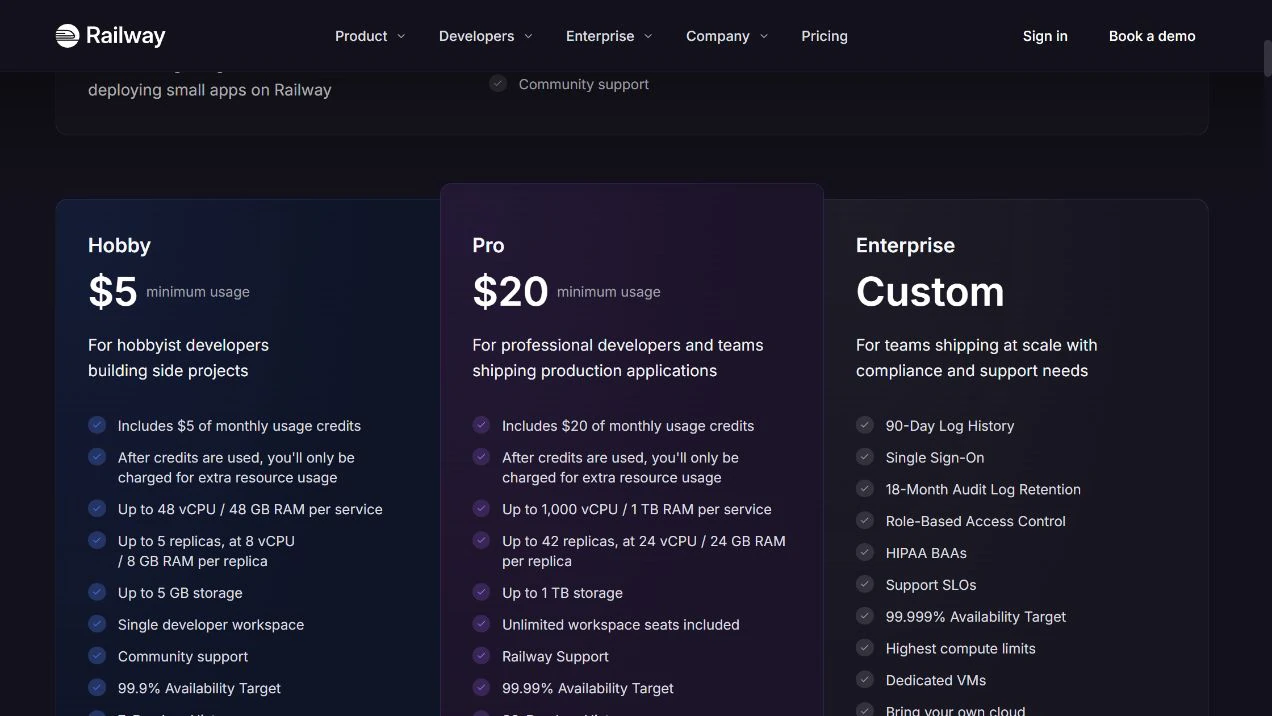
Railway’s trial supplies $5 of credit for up to 30 days. Its continuing Free plan supplies $1 of usage credit per month. Those are different allowances: do not turn the trial’s $5 into a permanent monthly hosting budget.
Render’s Free web services sleep after 15 minutes without incoming traffic and take time to wake. Their local files are not durable across restarts, redeployments or sleeping. Free web services also share a workspace allowance of 750 running hours per month. A Free PostgreSQL database expires after 30 days, so it is not a permanent database for customer records.
These limits can be fine for a disposable practice app. They matter much more for a webhook receiver, an order tool or something a colleague expects to respond immediately. Do not add artificial traffic merely to disguise a free service’s restrictions.
Compare the whole bill
Railway Hobby has a $5/month minimum, including $5 of resource use. If usage is $3, the bill is $5; if usage is $8, the bill is $8, not $13. Its Pro plan has a $20/month minimum with $20 included. These are billing examples, not estimates of your app’s actual use.
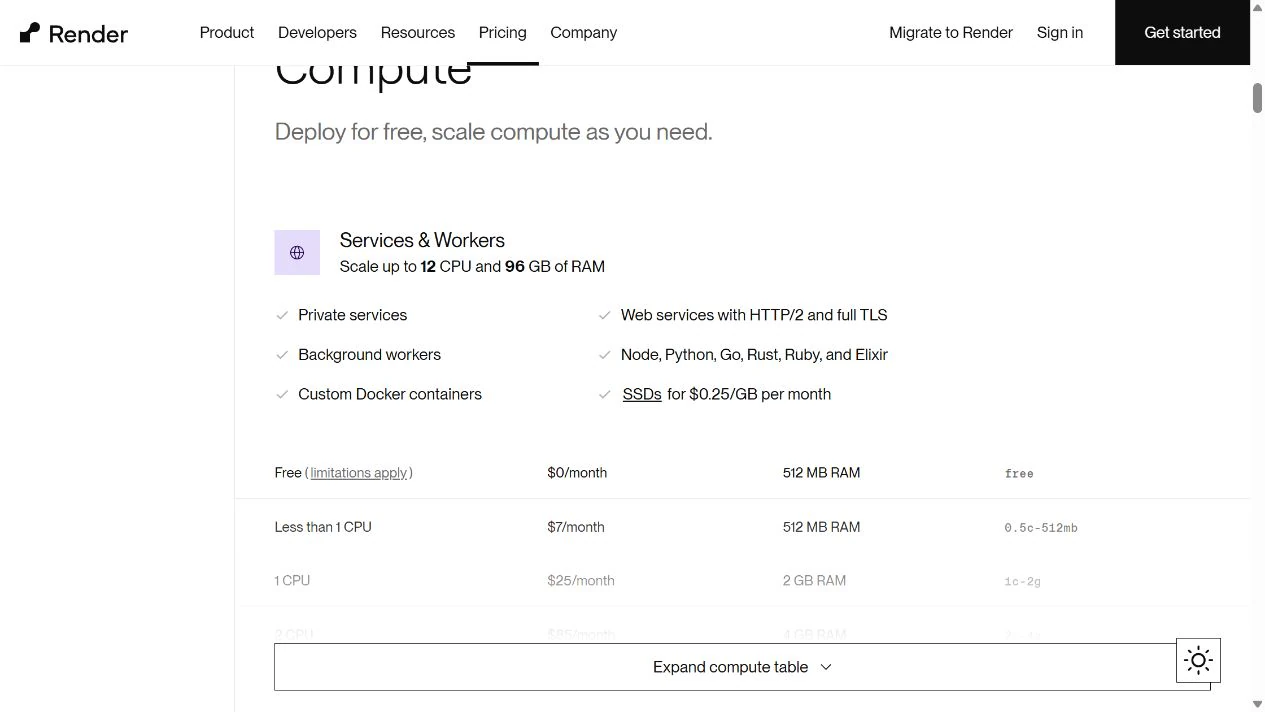
Render’s public compute table starts a paid web-service size at $7/month for 512 MB RAM and less than one CPU. The Hobby workspace itself is $0 plus compute. A paid workspace is a separate choice; you do not automatically need one because you use a paid service.
Those numbers do not establish that Railway costs $5 and Render costs $7 for the same workload. Railway’s actual usage can exceed its minimum; Render may need a larger size, a database, disk or additional usage. A 512 MB process limit is a capacity constraint, not a guarantee that an arbitrary Python or Node app fits.
For an honest estimate, list:
- the web process and any separate worker;
- the database, if the app actually uses one;
- persistent files, such as uploads;
- outbound traffic and any plan-specific usage;
- workspace features you genuinely need.
Do not add a paid database to a stateless app, and do not omit one from an app that relies on it. Both platforms provide hosted service addresses; a new domain is optional for this comparison.
Keep control of an experiment
On Railway, use its cost controls before leaving a project running. An alert tells you about spending; a hard limit can stop workloads. Choose the behavior that matches the app’s importance.
On either platform, closing a browser tab or stopping requests does not reliably end paid resource charges. When the experiment ends, check the provider’s dashboard for remaining services, databases and storage, then check subscriptions and billing separately. Export any needed data before removing resources.
Your next step
Choose Render Free for a disposable web practice app if its sleep and storage restrictions fit. Compare paid service sizes for an app that must respond reliably. Choose Railway when resource-based billing and its project workflow fit your app, then check usage and spending controls rather than assuming the minimum is the final price.
Take your repository to the platform’s official deployment guide and confirm the build command, start command and storage needs before provisioning. For a continuously running Python script where you want direct server control, our Ubuntu VPS guide is another route; it is not a Railway or Render deployment tutorial.
Sources and useful links
- Railway pricing — current plans and the trial/Free distinction.
- Railway plan accounting — included usage and bill examples.
- Railway cost controls — alerts and limits.
- Render pricing — workspace prices and the separate compute table.
- Render Free limitations — sleeping services, temporary storage and database expiry.
- Render deployment guides — start with the guide for your framework and service type.