Vercel pricing: what a small project pays for on Hobby and Pro
Understand Vercel's personal-use Hobby plan, Pro's monthly fee and usage credit, extra deploying seats, and the budget checks to make before upgrading.
In this guide
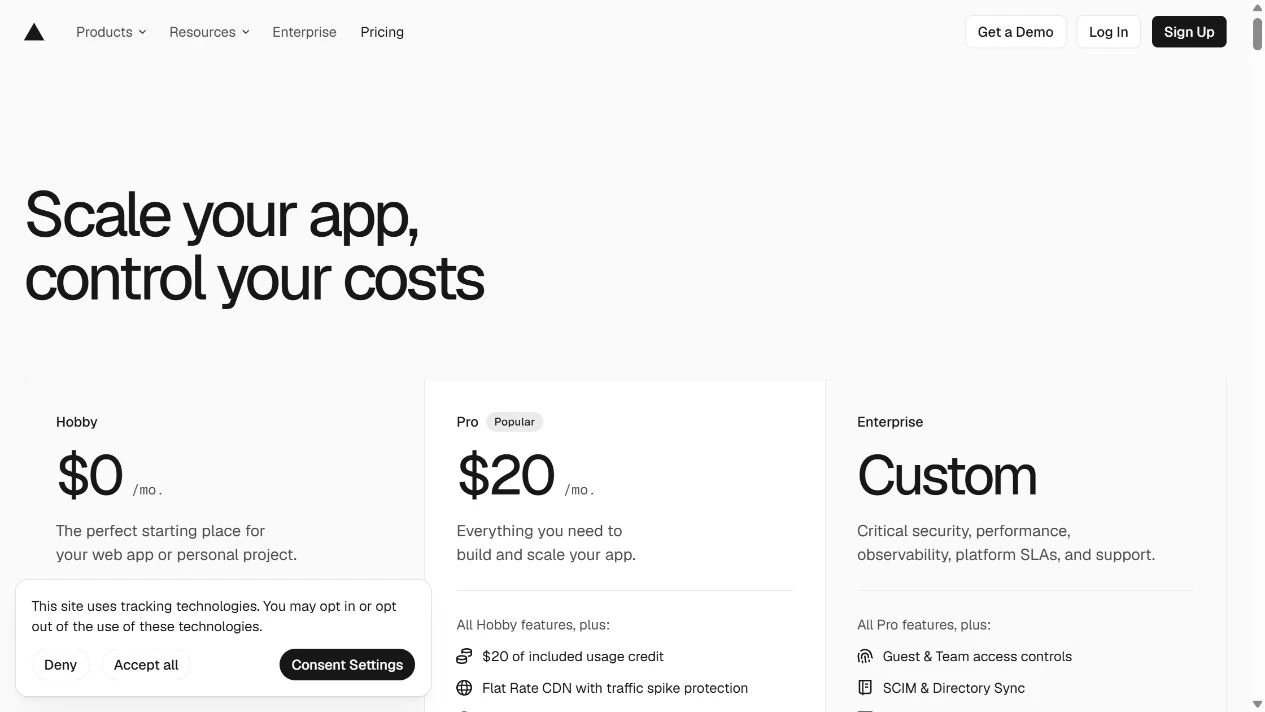
Vercel Hobby is free for personal, non-commercial use. Pro starts at USD20 per month, including one person who can deploy and USD20 in monthly infrastructure credit. Pro can cost more when you add deploying members, paid extras or usage beyond what is included.
The first decision is what your project does, not how little traffic it gets. A small business website does not become a personal project because it has few visitors. If your current hosting already meets your needs, you do not need to move just to use Vercel.
The figures here were checked on October 5, 2026, in USD, billed monthly, before applicable taxes. They describe ordinary published plans, not an account-specific quote or a prediction of your bill. Vercel’s pricing model changes; check the current pricing page before paying.
Start with the project’s purpose
Use Hobby for an eligible personal project within its limits. For a revenue-generating site, client work or a business application, check Pro rather than assuming the free plan permits it. Vercel’s Hobby documentation limits it to non-commercial personal use.
If you are unsure whether your particular project counts as commercial, ask Vercel before relying on Hobby. A portfolio and a service-selling website can serve different purposes even when both have only a few pages.
Hobby also has usage limits. It is not an unlimited hosting promise; exceeding a limit can make a feature unavailable until its allowance resets. Upgrading should solve an actual eligibility, capability or capacity need.
Separate the fee from the usage
A deploying seat is a person with permissions to publish or manage projects. A usage credit pays for eligible infrastructure consumption; it is not cash back or a discount on the platform fee.
| Component | Current monthly treatment | What it means for a small project |
|---|---|---|
| Platform fee | USD20; one deploying seat included | A recurring fee even in a quiet month |
| Infrastructure credit | USD20 included each month | Covers eligible metered usage; unused credit does not build up |
| Extra deploying people | USD20 per additional seat | Two people who deploy means one extra paid seat |
| Viewer access | Free read-only viewer seats | Viewing or commenting is different from deploying |
| Extra usage and add-ons | Additional charges where applicable | Check the resources and extras your project actually uses |
Content delivery is the service that sends page files to visitors. Pro offers the lowest Flat Rate CDN tier at no extra cost: 1 million CDN requests and 1 TB of transfer per month. Check that Flat Rate CDN is enabled in Billing before treating those as your included delivery capacity. Without it, the relevant CDN resources are billed on demand.
Exceeding the monthly capacity moves the team to a higher tier at the start of the next cycle; that tier can add a recurring charge. This is not unlimited delivery. Read the Flat Rate CDN conditions, including eligibility, before relying on the allowance. Other resources, such as functions and image processing, keep their own billing rules.
Use the current resource pricing for your region and selected delivery model. A page view is not one universal billing unit: it can request several files or run server-side code. You cannot turn “1,000 visitors” into a reliable invoice without knowing what those visits do.
A small monthly calculation
Suppose you run a commercial project with one deploying person, no paid add-ons, Flat Rate CDN enabled at its included tier, and eligible CDN traffic within that capacity. Assume its other eligible infrastructure usage has a metered value of USD8 this month. This is a calculation example, not a measured website workload. The included CDN traffic is not counted again as credit-consuming usage.
The USD20 credit covers that USD8, so the total is USD20 before tax: the platform fee, with no additional eligible usage charge. The unused USD12 credit does not carry over.
Now keep the same assumptions, but let eligible infrastructure usage reach USD35. The credit covers USD20, leaving USD15:
USD20 platform fee + USD15 additional usage = USD35 before tax.
If a second person also needs to deploy, add one USD20 seat. The second example becomes USD55 before tax. A client who only needs suitable read-only viewer access does not automatically need that paid seat.
Do not add a paid database, an AI service or another domain to this example unless your project requires one. Conversely, any service you already pay for remains a real expense even if moving to Vercel creates no additional charge for it.
Set a budget deliberately
Before putting a Pro project in service, review your team’s Settings → Billing → Spend Management. Setting a budget or receiving notifications does not itself stop usage. If you want production to pause when the budget is reached, enable the corresponding Pause Production Deployments option.
There is a trade-off: this action pauses all production projects on the team, so they stop serving normally. Vercel checks usage periodically, so pausing can lag behind the threshold. It does not stop AI Gateway API-key or v0 usage if you use those services. This is a safeguard, not a guarantee that an invoice cannot exceed an exact amount.
On Pro, this budget measures additional metered spend beyond the monthly credit, not the whole invoice. It does not include seats, separate add-ons or Marketplace charges. Leave room for those fixed costs and any delay. Check the Spend Management documentation before relying on it for a financial limit.
Choose the next action for your situation
- Personal, non-commercial project that fits Hobby: stay on Hobby and watch the relevant limits. You do not need Pro just because it exists.
- Small commercial project that needs Vercel: budget for the platform fee, count deploying people and identify your billable resources before upgrading.
- Existing Pro account: look at actual usage and enabled extras before changing plans. An unexpectedly high bill needs a resource breakdown, not a guess based on visitor counts.
- Project already served well elsewhere: compare a concrete missing capability and the cost of moving. Staying put can be the sensible choice.
Your useful result is a plan decision and a short cost list: platform fee, extra seats, applicable usage and genuine extras. If those are still unknown, gather them before treating a headline price as the full monthly bill.
Sources and useful links
- Vercel pricing — current plan comparison and purchase starting point.
- Hobby plan — personal-use eligibility and limits.
- Pro plan — platform fee, seats, credit and included CDN capacity.
- Resource pricing — usage categories, regional prices and tax treatment.
- Flat Rate CDN — enabling the included tier, eligibility and what exceeding capacity changes.
- Spend Management — budget actions, exclusions and pausing limitations.