Zapier Free plan: what you can run before paying
Check whether a simple Zap fits the Free plan's steps, apps, 100 monthly tasks and polling interval, and avoid mistaking a trial for permanent free access.
In this guide
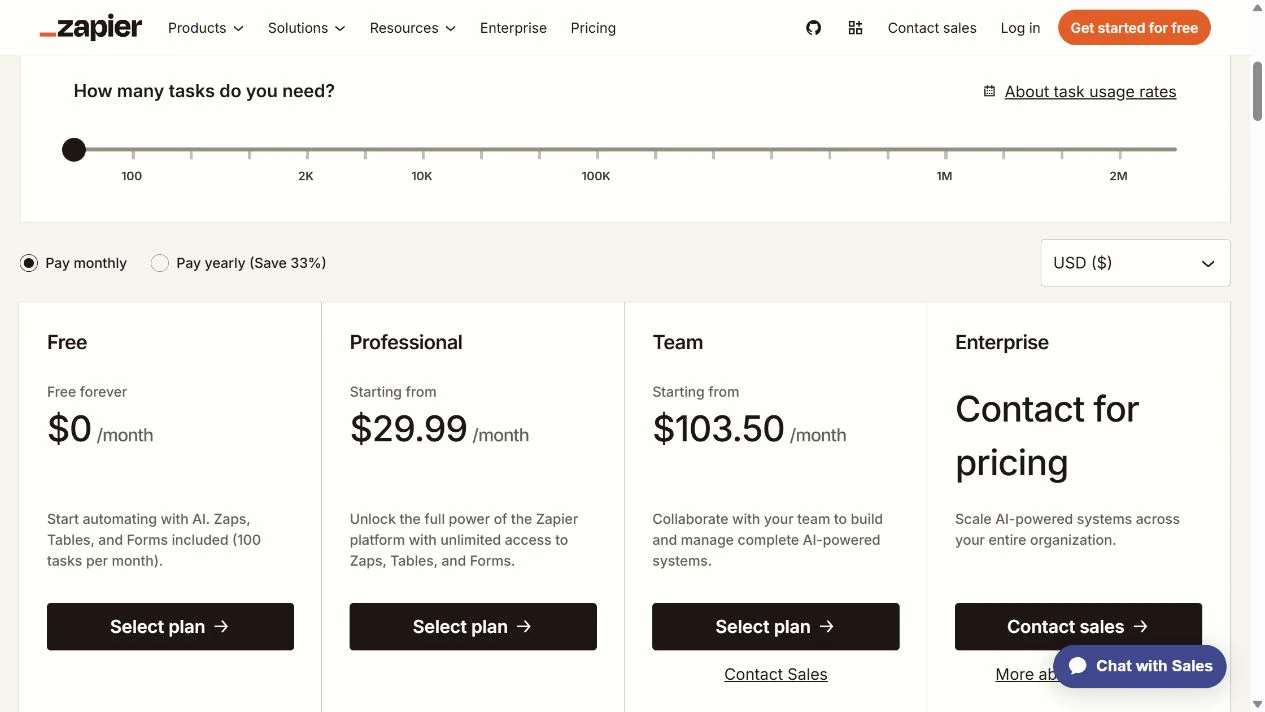
Zapier’s permanent Free plan can run simple two-step automations: one trigger and one action, using supported non-premium apps, within 100 shared tasks per month. It can be enough for a small job. It is not the same as the paid features you may see during a trial.
Write down your job in one sentence before comparing plans. For example: “When a new row appears in my intake spreadsheet, copy it to the tracking spreadsheet.” That gives you a start event, one result and something to count.
This guide helps you decide whether your job fits Free. It is not an account-connection tutorial. The plan conditions below were checked on October 8, 2026; check the current Free-plan details before relying on them for an ongoing process.
Check four things, in this order
A trigger is the event that starts a workflow. An action is what it does next. Zapier calls the workflow a Zap. A task is its unit of counted work, not simply one whole automation; the accounting qualification below matters to your allowance.
| Check | Free-plan fit | Reason to look beyond it |
|---|---|---|
| Steps | One trigger and one action | The job needs several actions or paid workflow features |
| Apps | Required app/action is available without a Premium entitlement | A required app is marked Premium, or its own plan blocks access |
| Task volume | Up to 100 shared monthly tasks | Your account's counted work regularly exceeds that allowance |
| Delay | 15-minute checks for polling triggers | The job cannot tolerate that checking interval |
Check the exact trigger and action in Zapier’s app directory. The app name alone is not enough: the fields and event you need must be supported. A Premium label is a Zapier plan restriction; an external app may also require its own subscription or API access.
Polling means asking an app periodically whether something new happened. For those triggers, Free checks every 15 minutes. That is a checking interval, not a guaranteed deadline for delivery. Some triggers receive events directly instead; check the trigger you selected rather than applying the polling rule to every app.
Free is a single-user plan. Unlimited Zap workflows does not mean unlimited tasks: multiple workflows share the allowance. Zapier MCP actions also use that pool, so leave them out of your calculation only if you do not use them.
Count the work, not just the workflows
In our spreadsheet example, assume each new row completes one standard trigger and one successful row-creation action, with no other task-consuming workflows or tools in the account.
There is a current discrepancy worth checking before you rely on a precise total: Zapier’s task help says triggers do not count, while its pricing rate table lists standard trigger and action steps at one task each. For this two-standard-step example, plan for up to two tasks per new row until your account’s Usage and Zap History confirm the actual counting. Do not assume the lower figure is guaranteed.
| New rows in the month | Calculation | Free-plan result |
|---|---|---|
| 40 | 40 × 1–2 = 40–80 tasks | At least 20 left under these assumptions |
| 50 | 50 × 1–2 = 50–100 tasks | Can use the entire allowance |
| 60 | 60 × 1–2 = 60–120 tasks | Not guaranteed to fit Free |
Do not multiply every scheduled polling check as if each completed your workflow. Failed actions do not count as successful tasks in the task help, but they also have not delivered your result. On a paid plan, replaying an entire run can repeat already-successful actions and use tasks again; that replay mode is not available on Free.
Adding a second destination, such as an email notification after the copied row, is a separate plan question before it is a multiplication question: an ordinary multi-action Zap is outside Free’s two-step shape. Do not budget for it as if paying for extra tasks alone enables every feature.
When the Free allowance is exhausted, new runs can be held rather than completed. Do not assume they will all catch up automatically: manually replaying held runs requires a paid plan. Free permits replaying errored runs, which is a different case. If work is held, check its status and the replay requirements before relying on recovery. A process with a hard response deadline needs more than “usually fewer than 100.”
Make sure you are looking at Free, not a trial
New accounts receive an initial 14-day trial of paid features. A Zap that works during that period may depend on a Premium app, multiple actions or a shorter polling interval that permanent Free does not provide.
Before deciding the job costs nothing, check the plan shown in Billing and Usage and compare your workflow with the permanent Free boundaries above. A successful trial run proves neither Free eligibility nor that your usual monthly volume fits.
The initial new-user trial does not require a payment method. Zapier also has other trial arrangements that can require a card and convert to paid service. Read your actual trial’s end date and billing conditions; do not use “trial” as a synonym for “cannot charge me.”
Stay Free, simplify or compare a paid plan
Stay Free when one supported action delivers the whole result, the delay is acceptable and the account’s total task use fits with some margin. Record the allowance reset date and check usage as real activity arrives.
Simplify when you can remove an unnecessary action without losing the purpose of the job. If you only need Google Forms answers in a sheet, Forms can connect to Sheets directly; introducing a Zap for that alone may be unnecessary.
Compare paid options when a genuinely required app, step, speed or volume does not fit. Check the exact task tier, billing period and connected-app costs. Our Make versus Zapier comparison can help you compare the same job, rather than buying more features by default.
You have answered the plan question when you can name the trigger, action, required app entitlement, expected monthly task total and acceptable delay. Those five facts are a better starting point than counting how many Zaps you can create.
Sources and useful links
- Zapier Free-plan details — current allowances and workflow limits.
- Task accounting — the help article’s rules for actions, triggers, replay and held runs.
- Pricing rate table — the different published trigger accounting to check against your own usage.
- Premium apps — where to check an app’s plan requirement.
- Trial conditions — distinguish the initial trial from other trial and billing arrangements.
- Replay requirements — different rules for errored and held runs.