How to generate a sitemap for a static Astro site
Set the public site URL, generate an Astro XML sitemap, exclude unwanted routes, and check the actual built URLs without confusing a sitemap with indexing.
In this guide
A sitemap is a list of public page URLs that helps search engines discover your site. Astro’s official sitemap integration generates it from your built routes; you do not need to maintain a list by hand for every new article.
It does not make private pages safe, remove noindex, or guarantee that Google will index a page. Your page-generation and indexing decisions still matter.
Use this guide for an existing static Astro site deployed at a domain root, with a final public HTTPS address. The example uses Node 24, Astro 7.3.3 and @astrojs/sitemap 3.7.4, npm and a lockfile. If your project already produces a correct sitemap, inspect that output first rather than adding a second generator.
Add the integration to your existing configuration
Open a terminal in the project folder containing package.json and install:
npm install @astrojs/sitemap@3.7.4Keep package-lock.json. In astro.config.mjs, import the integration and add it to the existing integrations array. For a minimal project:
import { defineConfig } from 'astro/config';
import sitemap from '@astrojs/sitemap';

export default defineConfig({
  site: 'https://example.com',
  output: 'static',
  integrations: [
    sitemap({
      filter: page => {
        const path = new URL(page).pathname.replace(/\/+$/, '') || '/';
        return path !== '/thank-you'
          && path !== '/preview'
          && !path.startsWith('/preview/');
      },
    }),
  ],
});
Replace https://example.com with your actual public origin. Keep your current integrations and options instead of replacing the entire configuration with this example. For a site with a path prefix, preserve its base and adapt the filter to the resulting public paths.
The filter receives each complete URL. Here it omits an example confirmation page and a preview folder. Use your own unwanted routes, or omit the filter if every generated page belongs in the sitemap.
This integration does not read a custom publication: draft flag for you. Your page-generation code must keep drafts out of the build. A filtered page can still be reachable at its URL; exclusion from a sitemap is not access control or a robots rule.
Build, then open both sitemap files
Run your usual build and preview. With the standard Astro scripts:
npm run build && npm run preview -- --host 127.0.0.1 --port 4321The build should report sitemap generation in dist. Open http://127.0.0.1:4321/sitemap-index.xml. This index points to the sitemap file or files, commonly sitemap-0.xml for a small site.
Then open http://127.0.0.1:4321/sitemap-0.xml to inspect the actual page list. XML displayed without styling is normal.
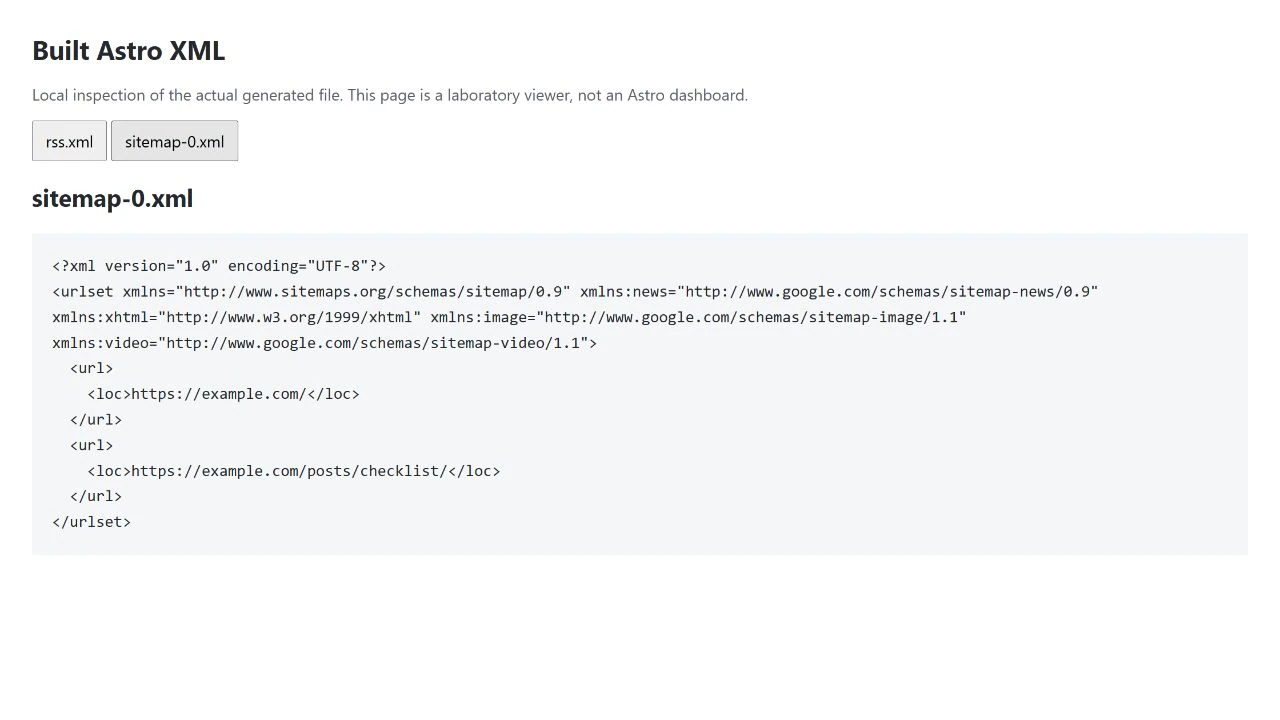
The XML uses the public origin from site, including in the index’s child sitemap links. During local preview, open the same path on the local preview address instead of following a placeholder or not-yet-deployed domain.
Check the URLs, not just the file’s existence
Choose your homepage and one article from the URL set. Confirm their paths open the intended pages on preview, then check that the origin and trailing-slash format match the public site’s canonical URLs.
Search the XML for your excluded paths and draft titles or slugs. Check the output folder separately to confirm drafts were not generated at all. Do not list redirect sources, error pages or private account pages as normal content URLs.
If you use runtime-generated routes with no static route list, the integration may not discover them. This example is for a static site; consult the integration’s customPages option only when you have genuine public URLs that the build cannot enumerate.
Common problems have straightforward causes:
- Wrong domain: correct
sitein the single central configuration, then rebuild. Do not patch generated XML by hand. - 404 in preview: check that the build finished, the files exist in the output, and the preview process serves that output. The sitemap is a build artifact, not necessarily present in the development server.
- Duplicate generators: look for an existing
public/sitemap.xml, endpoint or sitemap integration. Keep one deliberate source of truth rather than overwriting a working implementation. - Unexpected pages: adjust route generation for drafts and the filter for public-but-unwanted routes. Do not assume a noindex meta tag automatically filters a page from this integration.
Make it discoverable when the site is ready
If your site’s indexing policy allows discovery, add a sitemap declaration to its existing robots configuration. A plain static project might place this line in public/robots.txt:
Sitemap: https://example.com/sitemap-index.xmlUse the actual address and preserve existing robots directives. If your build already generates robots from central configuration, add the declaration there instead; do not create a conflicting second file. Do not open a deliberately noindex test site just to make this step work.
Stop preview with Ctrl+C. After a separately approved deployment, verify both XML files on the live domain and submit the index in your existing Search Console property if needed. No new property or DNS change is required just to add this sitemap.
A successful result is a current, accurate list of public canonical URLs. Search-engine crawling and indexing remain separate outcomes.
Sources and useful links
- Astro sitemap integration — generation, filters, custom pages and discovery.
- Astro site configuration — the origin used in generated URLs.
- Sitemap protocol — sitemap indexes and URL sets.
- Google sitemap guidance — what a sitemap helps with and what it does not guarantee.