Make error handlers: when to skip, retry or stop
Choose a Make error handler deliberately, rehearse a harmless HTTP failure, and check which data was skipped instead of trusting a green status.
In this guide
An error handler is a separate path Make follows when a module fails. It should answer a practical question: may this item be skipped, should it be retried, or must this run stop? Making the run green is not the goal.
The current interface uses Skip, Retry, Resume, Commit and Rollback. Older examples may call Skip “Ignore” or Retry “Break.” Use the labels in your current editor.
Start with an inactive copy of a scenario or the harmless HTTP practice below. Use a desktop browser and an existing Make account. Do not rehearse failures against live orders, payments or customer emails; manual runs still consume credits.
Choose what should happen to the failed item
| Situation | Suitable starting choice | What to check |
|---|---|---|
| A dispensable item can be omitted | Skip | The failed item is dropped; it does not continue down the ordinary route. |
| A temporary failure may succeed later | Retry | Store incomplete executions must be enabled, and replaying the action must be safe. |
| A known substitute output is valid | Resume | Later modules receive your substitute, not the failed module's real result. |
| The item must not be lost or fabricated | Leave the failure visible while fixing its cause | Read the error and investigate before resuming or replaying it. |
“Incomplete execution” means saved unfinished work that can be inspected or retried. It is not proof that the task eventually succeeded. Retry is appropriate for a temporary connection problem only if repeating the action will not create duplicate side effects.
Commit and Rollback deal with transaction behavior; not every module supports it. Rollback cannot unsend a delivered email. You do not need either for the read-only example below.
Create a controlled error
Create a new scenario called Error handling practice. Add the current HTTP → Make a request module:
- Authentication type: No authentication
- URL:
https://httpbin.org/status/404 - Method: GET
- Parse response: Yes; leave the other optional fields and advanced settings at their defaults.
Save the module and scenario. Keep scheduling Inactive. Click Run once, then open the execution bubble above HTTP. The endpoint deliberately returns 404, and the inspector should report the failure.
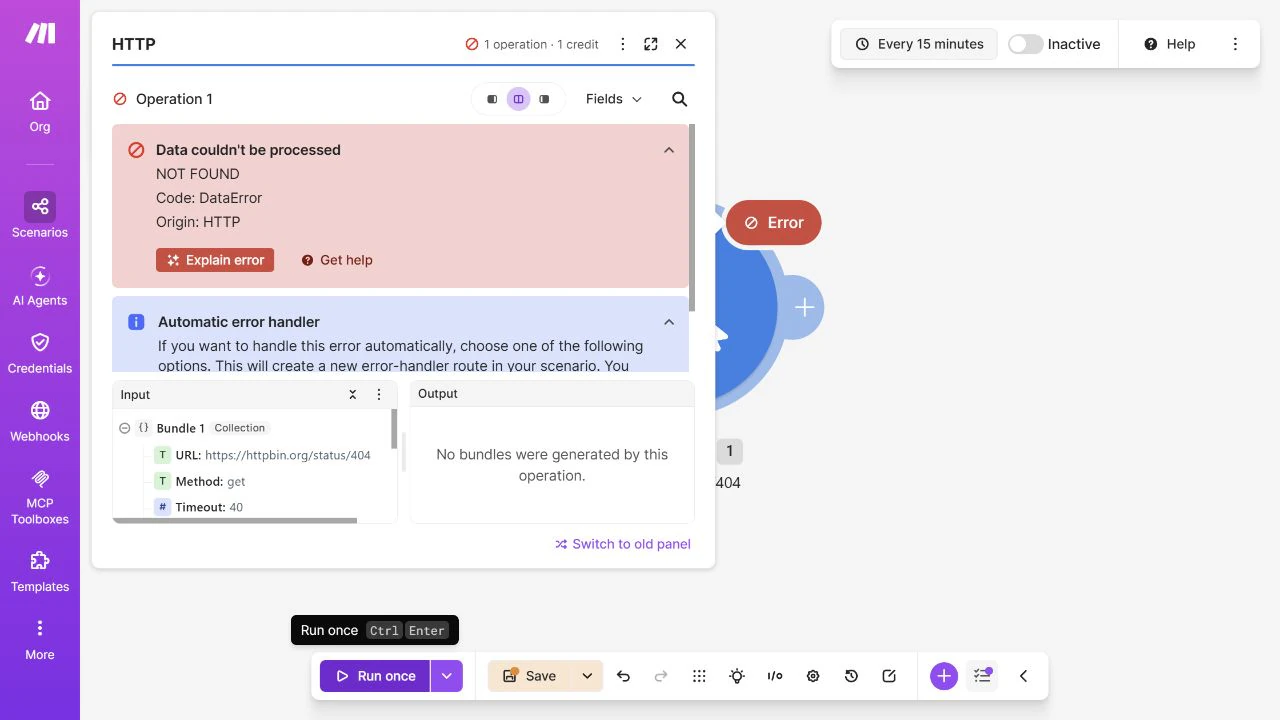
This wrong-resource response is useful for rehearsal, but retrying the same missing resource is not a repair.
The public test service can sometimes return 503 or time out instead. That is temporary service unavailability, not the intended 404. Wait and try later, and inspect the actual error before deciding what happened.
Add Skip only for this disposable test
Close the execution inspector. Right-click the HTTP module and choose Add error handler. On the new handler path, choose Skip. Save the scenario and run once again.
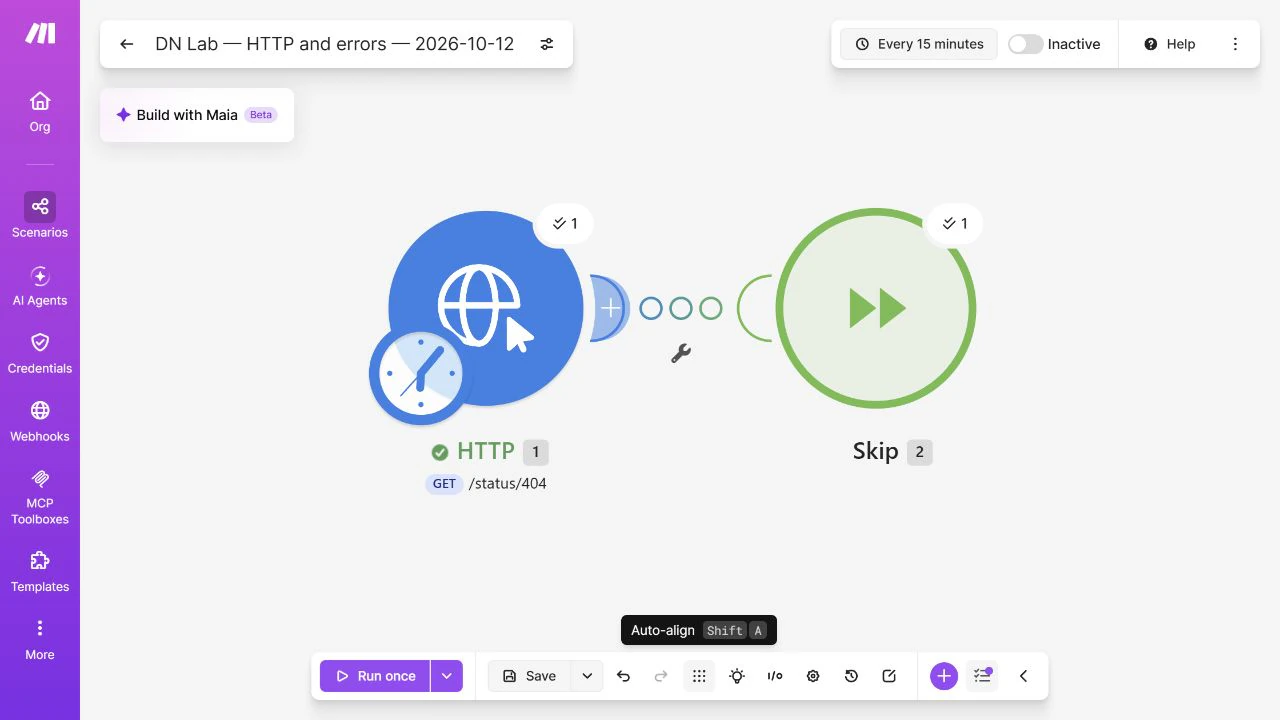
Check the execution details: HTTP still failed, but Skip handled that failed item. There is no successful HTTP response to use. If there were ordinary downstream modules, that item’s normal processing would not continue through them.
A completed or green run therefore does not mean that every requested item was processed. For a real workflow, compare expected items with actual destination records. Never skip an order merely to remove the red icon.
Use Retry or Resume only when the task allows it
For Retry, open Scenario settings and enable Store incomplete executions. Add or open the Retry handler on the failing module, then choose its retry policy in the handler’s settings to suit the service’s limits. Review the saved incomplete execution after a failure and confirm its eventual outcome. This article’s 404 rehearsal does not prove a future retry will succeed; do not switch it to automatic retries just to test the button.
Before retrying a write action, find out whether the first attempt could already have created a record. Use the destination’s duplicate protection or documented idempotency support—a way to recognize repeated requests—rather than assuming a timeout means nothing happened.
For Resume, supply only an output that is valid for the rest of the workflow. An empty optional description can be a valid fallback; a made-up payment confirmation cannot. If no substitute is safe, keep the failure visible and fix the cause.
Finish and leave practice inactive
Keep Inactive selected to prevent scheduled runs. If adapting an existing scenario, review its handler filters and history before re-enabling it; do not enable the practice scenario.
The useful result is knowing where a failed item went and what still needs attention. A handler is successful when it implements that decision, not when it conceals a missing result.
Sources and useful links
- Make error-handling overview — handler behavior, transaction limits and incomplete executions.
- Skip error handler — dropping a failed item without producing a normal output.
- Retry error handler — saved incomplete work and retry requirements.
- Resume error handler — substitute output for later modules.
- Current HTTP module — the request settings used for the controlled failure.