Make HTTP request: call an API and read its JSON response
Use Make's current HTTP module for one public GET request, inspect the returned data, and recognize a failed request without adding credentials.
In this guide
If a service gives you an API address but has no suitable Make module, HTTP → Make a request can ask that address for data. An API is a way for software to exchange information; GET asks to read it.
Start with one public request before adding credentials or a second app. We will read a small JSON example from httpbin, a public HTTP testing service, and inspect its returned title. Nothing is written to a customer system.
Use an existing Make account and a desktop browser. This guide uses the current HTTP v4 module; HTTP (legacy) has different fields. Manual runs use credits. Keep the scenario Inactive, and do not enter secrets in this practice.
Configure the request
- Open Scenarios → Create a new scenario, name it HTTP practice, and click the large plus.
- Search for HTTP and choose Make a request from the current HTTP app.
- Set Authentication type to No authentication. The example is public and requires no key.
- Enter
https://httpbin.org/jsonin URL. - Leave Method at GET. Leave Headers, Query parameters and Body content type unset.
- Scroll down and keep Parse response → Yes. This turns the returned JSON—structured text with named fields—into fields you can use later.
- Leave pagination unset; this response is one small result, not a series of pages. Save the module, then save the scenario with the bottom toolbar.
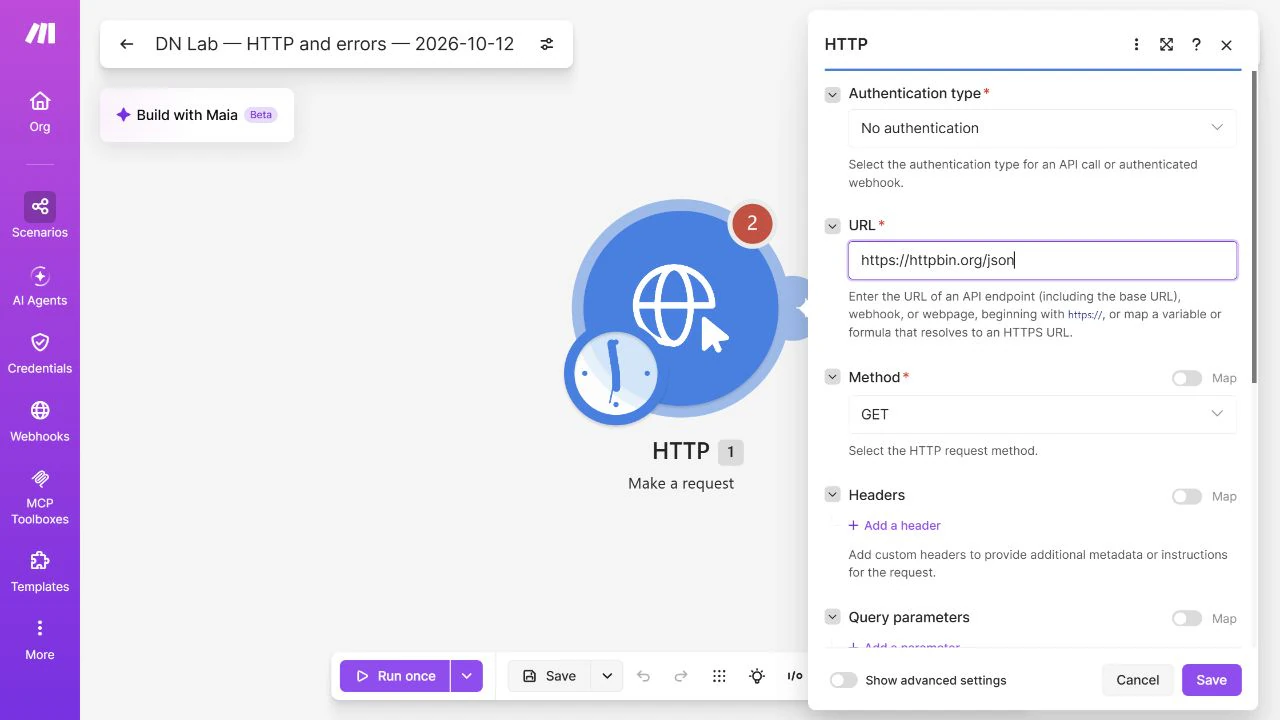
The current module expects an HTTPS URL. Do not replace a real service’s HTTPS address with HTTP or disable certificate checking to get past an error.
Run once and inspect the returned data
Click Run once and wait for the execution to finish. Click the numbered bubble above the HTTP module to open its inspector.
Under Output, check the Status code and expand Data → slideshow. A successful response should have status 200 and a title field, currently Sample Slide Show. The value is sample data, not a performance measure.
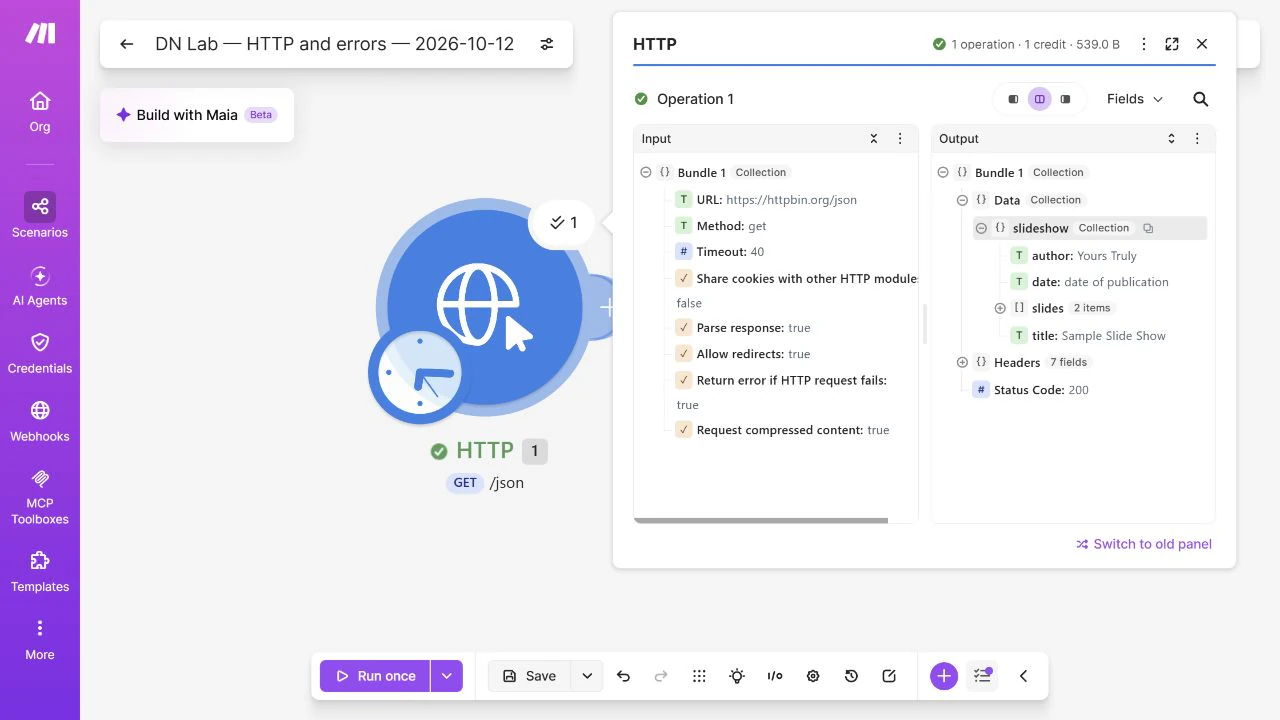
If you add a following module, click its target field and choose the HTTP output’s slideshow → title token in the mapping panel. A mapped token reads the actual response; typing that field name as ordinary text does not. You do not need that extra module just to verify this request.
If you see raw text rather than fields, check Parse response, then run the module again. If the body is HTML, you may have used a website page instead of the API endpoint. Consult the service’s API documentation for its exact address and response format.
Recognize a failure before connecting a real action
For one controlled failure, change the practice URL to https://httpbin.org/status/404, save the module and run once. That endpoint deliberately returns 404. With the default HTTP error behavior, the module should report an error rather than successful data.
This is not something to retry indefinitely: 404 usually means the requested address or resource is missing. Restore /json, save, and run once to confirm that the original request succeeds again.
If the public test service returns 503 or times out, it is temporarily unavailable. That is different from the intended 404. Wait and try later; check the status you actually received rather than treating every failed run as the same result.
For a real service, 401/403 usually points to authentication or permissions; 429 means you should respect the service’s rate limit. A timeout or temporary server failure needs a different decision from a wrong address. Inspect the actual error before adding a handler or repeating requests that might create something.
Move to your own API without exposing its key
Use the service’s documented URL, method, authentication and limits. Keep GET only if its documentation calls for a read request. POST, PUT and DELETE can change data; do not substitute them casually.
If the API requires credentials, use the current HTTP module’s appropriate saved connection type. This public rehearsal does not cover creating that connection. Do not paste a key into a screenshot, shared scenario note or URL merely because the no-auth example worked.
Leave the practice scenario Inactive when finished. Saving it does not enable scheduled runs. Your result is one inspected API response, ready to map into a workflow when the real service’s requirements are clear.
Sources and useful links
- Make HTTP documentation — current versus legacy modules, authentication, parsing and pagination.
- httpbin — the public testing service used for the sample JSON and deliberate status response.
- Make error-handling overview — why errors need a deliberate handling choice.