Why webhooks arrive twice—and how to avoid duplicate work
Recognize webhook retries, use a stable event ID to record work once, and test duplicate delivery without confusing it with exactly-once external actions.
In this guide
A webhook can arrive twice even when someone submitted a form only once. The sender may retry because it did not receive your success response, or because the connection failed after your receiver had already handled the event.
The useful question is not “How do I prevent every retry?” It is “How do I recognize this event before doing the work again?” Use the sender’s stable event ID and record it durably. Below, a local receiver records one work item, identifies an identical replay, and rejects different data reusing the same ID.
Decide what counts as the same event
An event ID identifies a particular event, not the person or order involved. One order can generate several legitimate events. Do not deduplicate every message with the same customer email or generate a fresh random ID when a retry arrives.
Before adapting this to a real receiver, read your sender’s delivery contract: where the ID is supplied, whether retries preserve it, how signatures are verified and how long delivery can repeat. For example, Stripe documents retries and duplicate-event handling; another provider may have different rules. You do not need a provider account for the local experiment below.
This example uses synthetic JSON, not a real provider. It runs on Windows PowerShell with Python 3.12, FastAPI 0.143.0 and Uvicorn 0.54.0. Its small SQLite database records work; it does not send an email or charge a customer. Keep it local—it has no sender authentication.
Prepare the receiver once
For an existing receiver, adapt the durable-ID check to its own database and verified event format. Do not replace it with this unauthenticated example. For a local experiment, create webhook-replay in File Explorer, open it and type powershell into the address bar.
Check python --version reports Python 3.12; use the official Python downloads if needed. Run:
If python --version reports another version, select your installed Python 3.12 interpreter before creating the sample environment. On Windows with the Python launcher, py -3.12 --version checks that interpreter and py -3.12 -m venv .venv creates the sample environment with it; if it is not installed, finish the official installation first.
python -m venv .venvAfter success:
.\.venv\Scripts\python.exe -m pip install fastapi==0.143.0 uvicorn==0.54.0Save this complete main.py beside .venv, using plain text and an actual .py extension:
import json
import sqlite3
from contextlib import closing
from pathlib import Path
from fastapi import FastAPI, HTTPException
from pydantic import BaseModel, ConfigDict, Field

app = FastAPI()
DB_PATH = Path(__file__).resolve().with_name("events.sqlite3")
with closing(sqlite3.connect(DB_PATH)) as db, db:
    db.execute("CREATE TABLE IF NOT EXISTS work (event_id TEXT PRIMARY KEY, payload TEXT NOT NULL)")

class Event(BaseModel):
    model_config = ConfigDict(extra="forbid")
    event_id: str = Field(min_length=1, max_length=100)
    request_id: str = Field(min_length=1, max_length=100)
    status: str = Field(min_length=1, max_length=50)

@app.post("/events")
def receive(event: Event):
    payload = json.dumps(event.model_dump(), sort_keys=True)
    with closing(sqlite3.connect(DB_PATH, timeout=5)) as db, db:
        try:
            db.execute("INSERT INTO work VALUES (?, ?)", (event.event_id, payload))
        except sqlite3.IntegrityError:
            previous = db.execute(
                "SELECT payload FROM work WHERE event_id = ?", (event.event_id,)
            ).fetchone()[0]
            if previous != payload:
                raise HTTPException(409, "This event ID already has different data.")
            return {"result": "duplicate", "event_id": event.event_id}
    return {"result": "recorded", "event_id": event.event_id}

@app.get("/work")
def work():
    with closing(sqlite3.connect(DB_PATH)) as db, db:
        records = db.execute("SELECT payload FROM work ORDER BY event_id").fetchall()
    return {"count": len(records), "items": [json.loads(row[0]) for row in records]}
SQLite is a local database stored in a file. The primary key allows only one row per event ID. The database enforces this during insertion, instead of a fragile “check, then insert” sequence that concurrent requests could both pass. Parameter placeholders keep the values separate from the SQL instructions.
closing closes each connection after its transaction. The event model accepts only the three declared fields: unknown fields return 422 instead of silently dropping data before comparing a replay.
Replay one event and inspect the result
.\.venv\Scripts\python.exe -m uvicorn main:app --host 127.0.0.1 --port 8000Leave the terminal running and open http://127.0.0.1:8000/docs. Expand POST /events, click Try it out, and replace the request body with:
{"event_id": "evt_lab_001", "request_id": "R101", "status": "pending"}Click Execute. The first response should say recorded. Execute the same body again; it should say duplicate, still with HTTP 200. In this local contract, that success response acknowledges a recognized replay without recording another item.
Expand GET /work, select Try it out → Execute and check count: 1. Seeing “duplicate” is useful; checking the stored work confirms the promised outcome.
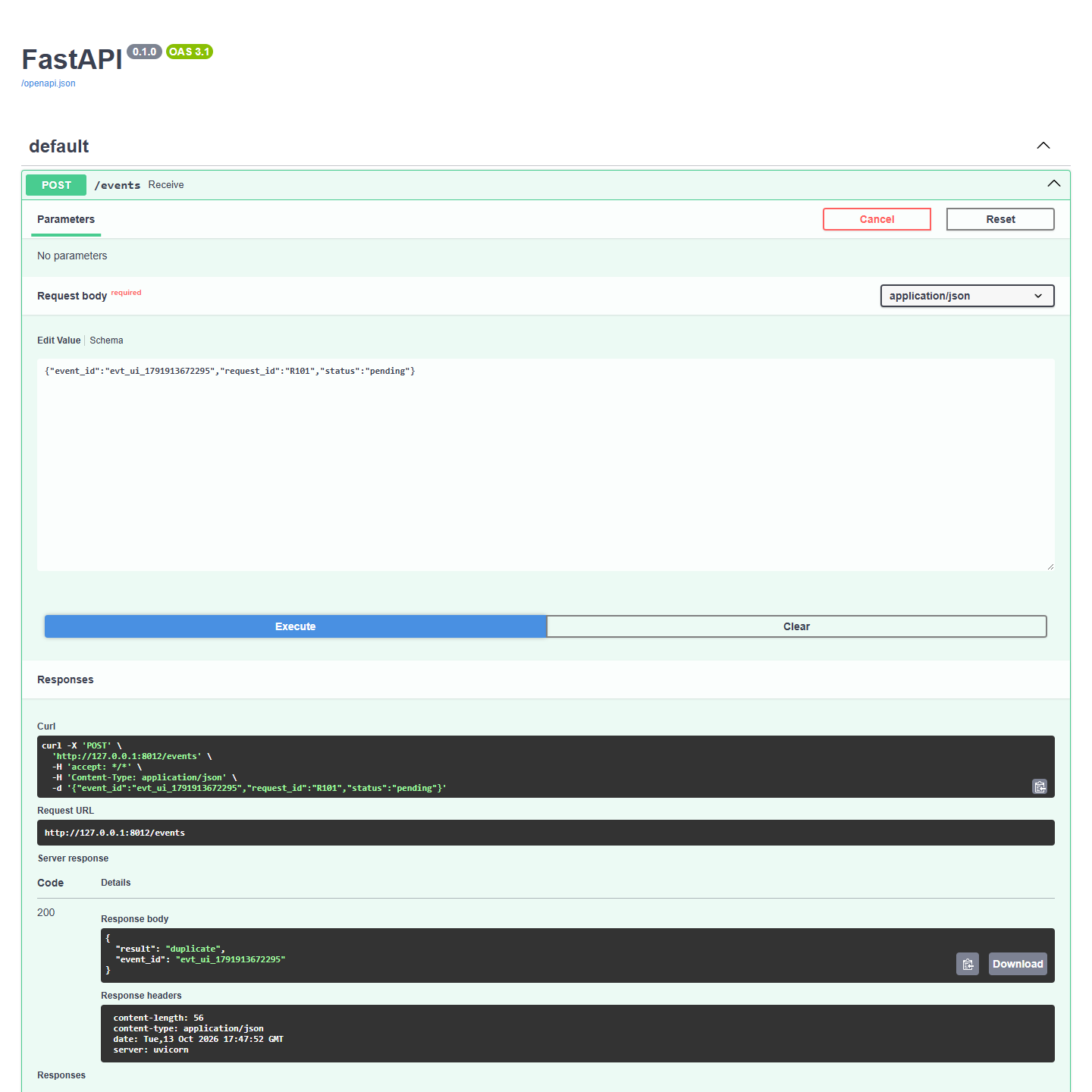
Now change only status to done and send it again with the same ID. Expect 409, a conflict. A genuine new event needs its own stable ID; do not overwrite the earlier event to make the error disappear.
Stop with Ctrl+C, start again and check GET /work. The row remains in events.sqlite3. To repeat the experiment without removing data, use a new ID such as evt_lab_002 and expect the count to increase by one.
Recording once is not the same as sending once
This receiver records an event and its work item in one database transaction. It does not prove that an external action happens exactly once. A worker could send an email, crash before marking it complete, and send again after restarting.
For a real integration, verify the sender’s signature before trusting the ID, scope IDs to the provider/account where needed, and use a durable queue with recovery rules. If the destination supports an idempotency key, reuse an appropriate stable key for that action too. “Idempotent” means repeating an operation has the same intended effect; a HTTP POST is not automatically idempotent.
Do not delete deduplication records sooner than the sender’s retry window just to shrink the database. And do not return success for a newly received event until the work has been durably accepted. Keep temporary database or queue failures visible to the sender so its retry policy can help.
Sources and useful links
- Stripe webhook documentation — a concrete provider’s retries, signatures and duplicate handling.
- Python SQLite documentation — local persistence, transactions and parameterized queries.
- HTTP semantics — idempotent methods and response codes.
- FastAPI request bodies — receiving and validating structured input.