FastAPI file upload: accept a small CSV with clear limits
Build a local CSV upload endpoint, return its row count, and give useful errors for empty, oversized or malformed files without trusting an uploaded filename.
In this guide
If a tool needs a CSV, sending a file is often easier than pasting its contents into a request. FastAPI’s UploadFile gives your endpoint an uploaded file object. Below, you will accept one small CSV and return its row count—or a clear error explaining why it cannot be used.
This runs locally, with Windows PowerShell, Python 3.12, FastAPI 0.143.0, Uvicorn 0.54.0 and python-multipart 0.0.32. It expects UTF-8 CSV with exactly request_id,status as the header. It does not save the upload or create a public file-sharing service.
Prepare one local API
If you already have a FastAPI app, keep its environment, install python-multipart there if missing, and add the endpoint rather than replacing your application. The complete example starts in a new folder.
In the existing environment, use its Python for python -m pip install python-multipart==0.0.32; skip the new-folder commands below. Keep your current FastAPI app object and add the imports, limit and function once. Use your usual local Uvicorn command and append /docs to its local URL; it may have a different module name or port from this example.
Create upload-api, open it in File Explorer, type powershell in the address bar and press Enter. Check python --version reports Python 3.12; install from the official Python downloads if needed.
If python --version reports another version, select your installed Python 3.12 interpreter before creating the sample environment. On Windows with the Python launcher, py -3.12 --version checks that interpreter and py -3.12 -m venv .venv creates the sample environment with it; if it is not installed, finish the official installation first.
python -m venv .venvAfter success:
.\.venv\Scripts\python.exe -m pip install fastapi==0.143.0 uvicorn==0.54.0 python-multipart==0.0.32File uploads use multipart form data, the format a browser uses to send file contents and form fields together. python-multipart lets FastAPI parse that format; installing a different package named multipart is not a substitute.
Save the endpoint and sample file
Save this as main.py beside .venv, using plain text and All files in Notepad:
import csv
import io
from fastapi import FastAPI, HTTPException, UploadFile

app = FastAPI()
MAX_BYTES = 100_000

@app.post("/csv-summary")
async def csv_summary(file: UploadFile):
    try:
        raw = await file.read(MAX_BYTES + 1)
    finally:
        await file.close()
    if len(raw) > MAX_BYTES:
        raise HTTPException(413, "Use a CSV of at most 100,000 bytes.")
    if not raw:
        raise HTTPException(400, "The uploaded file is empty.")
    try:
        text = raw.decode("utf-8-sig")
        reader = csv.DictReader(io.StringIO(text, newline=""), strict=True)
        if reader.fieldnames != ["request_id", "status"]:
            raise ValueError("Use the header request_id,status in that order.")
        rows = list(reader)
        if any(None in row or None in row.values() for row in rows):
            raise ValueError("Each row must have two fields.")
        if any(not row["request_id"].strip() or not row["status"].strip() for row in rows):
            raise ValueError("Every row needs a request_id and status.")
    except (UnicodeError, csv.Error, ValueError) as error:
        raise HTTPException(400, f"Could not read this CSV: {error}") from error
    return {"rows": len(rows), "columns": reader.fieldnames}
The code reads only enough content to enforce its 100,000-byte application limit and checks the actual CSV. It neither trusts the extension nor uses the supplied filename as a disk path.
Important for a future public service: multipart parsing happens before this endpoint reads the file. This is not a limit on the entire incoming HTTP request or temporary upload storage. Set an appropriate request-body limit at the hosting proxy and add authentication and concurrency controls before exposing it publicly.
For the first check, save requests.csv as UTF-8:
request_id,status
R101,pending
R102,done
Send the upload from the browser
.\.venv\Scripts\python.exe -m uvicorn main:app --host 127.0.0.1 --port 8000Leave the terminal running. Open http://127.0.0.1:8000/docs. This is Swagger UI, FastAPI’s request-testing page.
Expand POST /csv-summary, select Try it out, choose requests.csv in the file control and click Execute. Under Server response, look for 200 and:
{"rows": 2, "columns": ["request_id", "status"]}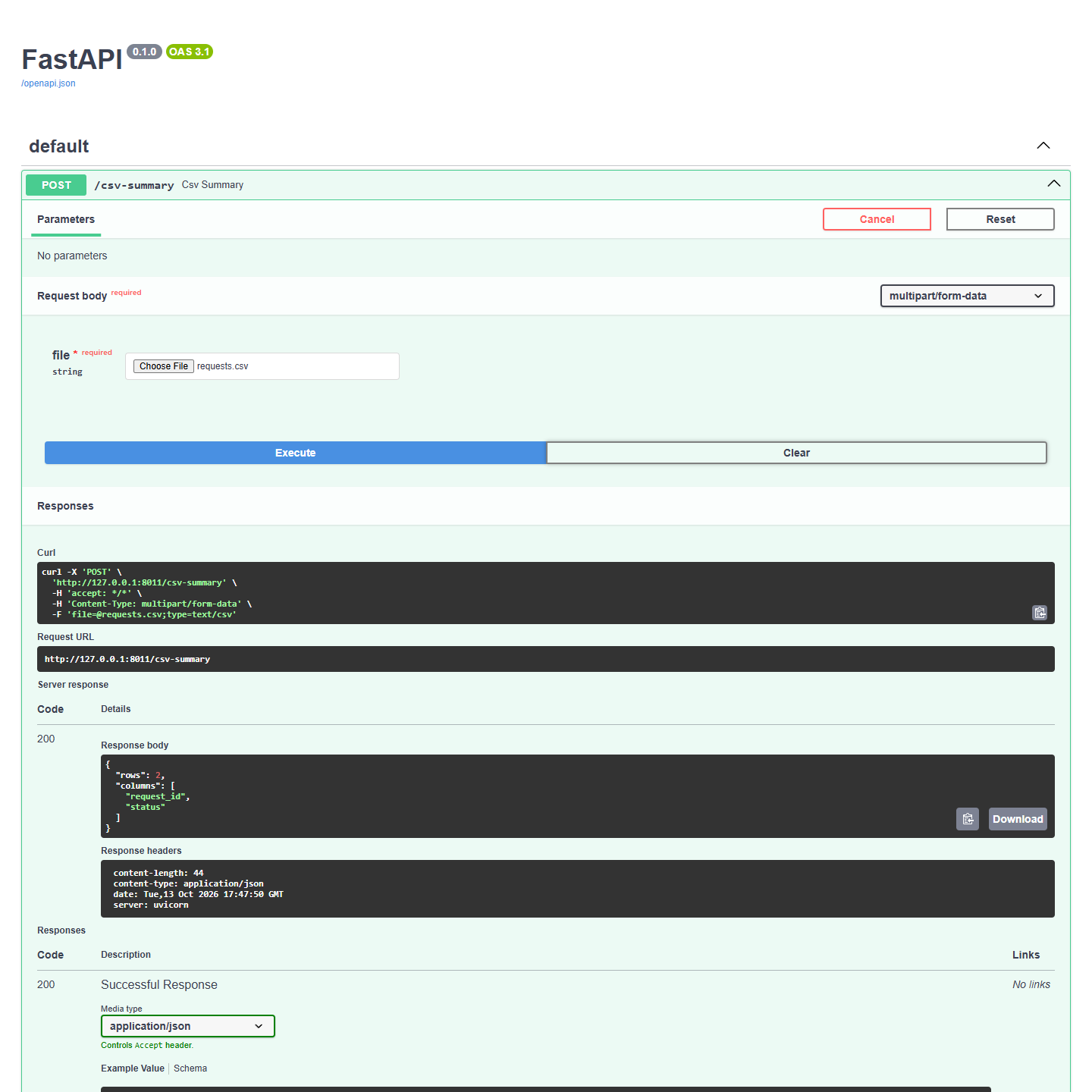
Check a rejected file too
Save a second file with the header name,email and upload it. Expect 400 with the required-header message. An empty file also returns 400; content beyond the stated byte limit returns 413, meaning the upload is too large for this endpoint. A header-only valid CSV returns zero rows.
For an empty-file check, save a new blank empty.csv. For the size check, create a new fixture from the project folder with [System.IO.File]::WriteAllBytes('too-large.csv', [byte[]]::new(100001)) in PowerShell, then upload it. This produces a deliberately oversized test file; use a new filename so you do not replace your data.
To exercise the encoding error, create a new not-utf8.csv fixture with [System.IO.File]::WriteAllBytes('not-utf8.csv', [byte[]](114,101,113,117,101,115,116,95,105,100,44,115,116,97,116,117,115,10,255)). Those bytes include an invalid UTF-8 byte after the header. Upload it and expect 400; keep your original CSV unchanged.
422 usually means FastAPI did not receive the required file field at all. Use the Swagger file control, or make sure another client sends a multipart field named exactly file, not a JSON filename. If startup complains about form-data support, install python-multipart with this environment’s Python and restart.
Press Ctrl+C to stop the local server. No uploaded file was saved by the endpoint. If port 8000 is already used, choose another unused port in the start command and use that same port in the browser.
Sources and useful links
- FastAPI request files — multipart support and UploadFile.
- FastAPI handling errors — returning a meaningful HTTP error.
- Starlette request parsing — multipart parsing and its resource limits.
- Python CSV documentation — reading headers and malformed rows.