FastAPI 422 error: find the invalid field and fix the request
Read FastAPI's validation response, distinguish body and query errors, and fix a small request without disabling validation.
In this guide
FastAPI usually returns 422 when a request reaches a route but its input does not match the route’s requirements. Read the response’s detail list: loc tells you where the problem is, and msg explains the failed check.
You generally need to fix the request or clarify the intended input model—not restart the server, buy hosting or remove validation.
If you already have a failing app, start with the next section and inspect its actual response. The small optional rehearsal later lets you see the same process locally. It checks a fictional workshop request without saving a booking.
Read the first error before changing code
Find the request in your client’s response or in FastAPI’s /docs Server response area. Do not confuse the documentation’s example 422 with an error from an executed request.
For example, a request with seats: 0 may produce:
{"detail":[{"loc":["body","seats"],"msg":"Input should be greater than or equal to 1","type":"greater_than_equal"}]}This is a shortened example of the error fields, not the complete response. body means the JSON sent with the request; seats identifies the field. The rule requires at least one seat, so zero is not valid.
| Location or message | Check first |
|---|---|
| body, then a field name | The JSON body: spelling, nesting, missing fields and value types. |
| query, then a field name | The query string after ? in the request URL; a JSON field will not replace it. |
| path, then a field name | The value inside the route's URL path. |
| Field required | Send the required field in the expected location, or deliberately change the contract if it should be optional. |
| A number/type/range error | The actual value and the model's allowed type or limits. |
There may be several errors. Correct all relevant entries, then send the request again. If the response is custom rather than FastAPI’s usual validation structure, inspect the app’s error handler too; not every application uses 422 in exactly the same way.
Optional: reproduce the error in a small local app
Use Windows PowerShell and Python 3.12. These commands use FastAPI 0.143.0, Pydantic 2 and Uvicorn 0.54.0. If you already have a project environment, use it and do not install a second copy merely to diagnose its request.
For a separate rehearsal, create an empty validation-practice folder. Open PowerShell there from File Explorer’s address bar. Check python --version; install Python from its official downloads if it is missing. Create the environment:
python -m venv .venvAfter it succeeds, install the packages:
.\.venv\Scripts\python.exe -m pip install fastapi==0.143.0 uvicorn==0.54.0Save this complete file as main.py, not main.py.txt, beside .venv:
from fastapi import FastAPI
from pydantic import BaseModel, Field

app = FastAPI()

class BookingRequest(BaseModel):
    session: str
    seats: int = Field(ge=1, le=6)

@app.post("/check-booking")
def check_booking(request: BookingRequest):
    return {"session": request.session, "seats": request.seats, "valid": True}
The model describes the required input. ge=1 means at least one, and le=6 means no more than six. It validates the request’s shape and range; it does not check live availability or reserve seats.
Start it from that folder:
.\.venv\Scripts\python.exe -m uvicorn main:app --host 127.0.0.1 --port 8000Keep the terminal open. If port 8000 is already occupied, use --port 8002 and the matching browser address. Do not stop an unrelated process.
Send the invalid request, then correct it
Open http://127.0.0.1:8000/docs, expand POST /check-booking, and click Try it out. Replace the request body with:
{"session":"Morning","seats":0}Click Execute. Under Server response, expect 422, loc: ["body", "seats"] and the message about the minimum of one.
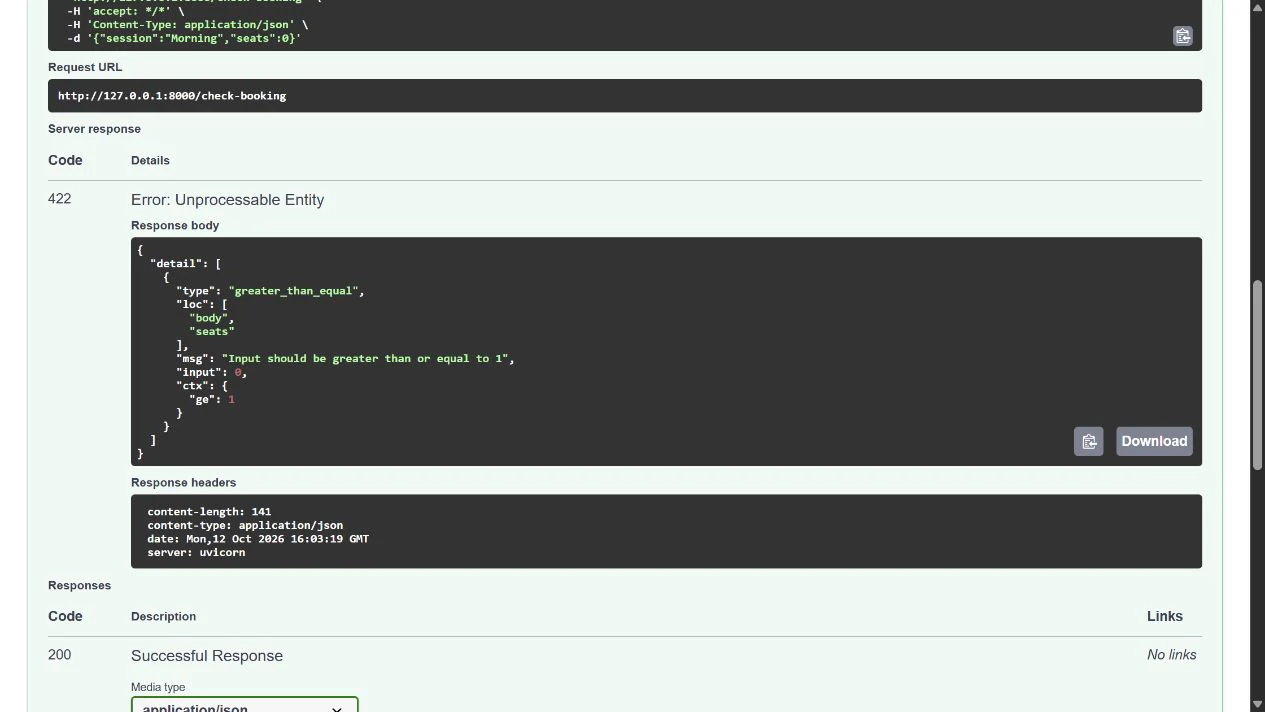
Change only seats to 2 and execute again. Expect 200 and an output containing "session":"Morning", "seats":2, and "valid":true.
The fix is complete when your intended valid input succeeds and invalid input still receives a useful error. Returning 200 for everything would hide the problem.
Check the client and the contract agree
If /docs succeeds but your other client fails, compare the actual URL, HTTP method, Content-Type: application/json, and body. A browser address-bar visit sends GET; it does not submit this POST body. Sending form fields instead of the expected JSON can also cause a mismatch.
Do not make a required field optional just to silence a missing-field error unless the application genuinely supports its absence. For a correct request rejected by an outdated model, update the model and its tests deliberately, then restart the app and check both valid and invalid inputs.
For the rehearsal, press Ctrl+C in the server terminal and wait for the prompt. No booking was created and no external service needs cleanup.
Sources and useful links
- FastAPI request bodies — how models define JSON input.
- Body fields and constraints — range rules such as ge and le.
- FastAPI error handling — validation errors and custom handlers.
- Official Python downloads — the interpreter prerequisite for the optional rehearsal.