Python dotenv: load .env settings without putting keys in code
Load a specific local .env file, validate a setting and keep credentials out of Git and API responses, with a small working Python example.
In this guide
Python does not automatically read a .env file. python-dotenv reads it and places its values in the running process’s environment, where your code can retrieve them with os.getenv().
Use it when a local app needs settings outside its source code: a timeout, a report filename or an API credential. Below, a small FastAPI app loads one known file and displays only safe settings. You will check a successful load and a bad value; no real credential or external API is needed.
Keep one settings path and one environment
The complete example uses Windows PowerShell, Python 3.12, python-dotenv 1.2.4, FastAPI 0.143.0 and Uvicorn 0.54.0. If you already have a Python project, keep its environment, install only the missing dotenv package, and apply the load/validation pattern to your code. FastAPI is just the example’s browser interface; dotenv itself does not require a web framework.
For that existing-project path, use its Python for python -m pip install python-dotenv==1.2.4, skip the environment commands below, and keep your usual start command. Add the explicit path/load and required validation before your code uses those settings. Do not add a second FastAPI app or install a web framework just to load a file.
For the complete example, create dotenv-check, open it in File Explorer and type powershell into the address bar. Check python --version reports Python 3.12; use the official Python downloads if missing.
If python --version reports another version, select your installed Python 3.12 interpreter before creating the sample environment. On Windows with the Python launcher, py -3.12 --version checks that interpreter and py -3.12 -m venv .venv creates the sample environment with it; if it is not installed, finish the official installation first.
python -m venv .venvAfter success:
.\.venv\Scripts\python.exe -m pip install python-dotenv==1.2.4 fastapi==0.143.0 uvicorn==0.54.0Add these rules to .gitignore, preserving anything already there, before adding a real key:
.venv/
.env
Save the settings and read them explicitly
Save a UTF-8 plain-text file named .env beside .venv. In Notepad use All files and check that it is not .env.txt:
REPORT_NAME=weekly-requests.csv
REQUEST_TIMEOUT=10
API_TOKEN=not-a-real-token
These are instructional settings; the token cannot connect to anything. A .env file is plain text, not encryption. Restrict access to the folder and keep it out of shared downloads and screenshots.
For the complete example, save this as main.py in that same folder. In your existing project, copy the path/load and validation section into the script that needs the settings, leaving out the FastAPI import, app and endpoint if you do not use FastAPI:
import os
from pathlib import Path
from dotenv import load_dotenv
from fastapi import FastAPI

ENV_PATH = Path(__file__).resolve().with_name(".env")
load_dotenv(ENV_PATH, override=False, encoding="utf-8-sig")

report_name = os.getenv("REPORT_NAME", "weekly-requests.csv")
raw_timeout = os.getenv("REQUEST_TIMEOUT", "10")
try:
    timeout = int(raw_timeout)
except ValueError as error:
    raise ValueError("REQUEST_TIMEOUT must be a whole number from 1 to 60.") from error
if not 1 <= timeout <= 60:
    raise ValueError("REQUEST_TIMEOUT must be a whole number from 1 to 60.")
token_configured = bool(os.getenv("API_TOKEN", "").strip())

app = FastAPI()

@app.get("/settings")
def settings():
    return {
        "report_name": report_name,
        "request_timeout_seconds": timeout,
        "token_configured": token_configured,
    }
The path is explicitly the .env next to main.py. It does not search parent folders and accidentally load another project’s settings. override=False preserves variables already supplied by the terminal or host; the local file fills values that are not set.
Environment values are text. Converting and validating the timeout prevents a typo such as ten from becoming a mysterious later failure. The API returns a boolean indicating presence, never the token itself. Presence does not prove that a token is valid.
Start and check the loaded values
In an existing project without this sample endpoint, temporarily add print({"request_timeout_seconds": timeout, "token_configured": token_configured}) immediately after validation, then run your usual start command. With the supplied fictional settings and no pre-existing timeout or token, the terminal should show 10 and True. Print only these non-secret checks, remove that diagnostic line afterward, and use the same stop/edit/restart checks below with your normal command.
The browser instructions below belong to the complete FastAPI example:
.\.venv\Scripts\python.exe -m uvicorn main:app --host 127.0.0.1 --port 8000Leave the terminal running and open http://127.0.0.1:8000/docs. Expand GET /settings, click Try it out → Execute, and check the actual Server response:
{"report_name": "weekly-requests.csv", "request_timeout_seconds": 10, "token_configured": true}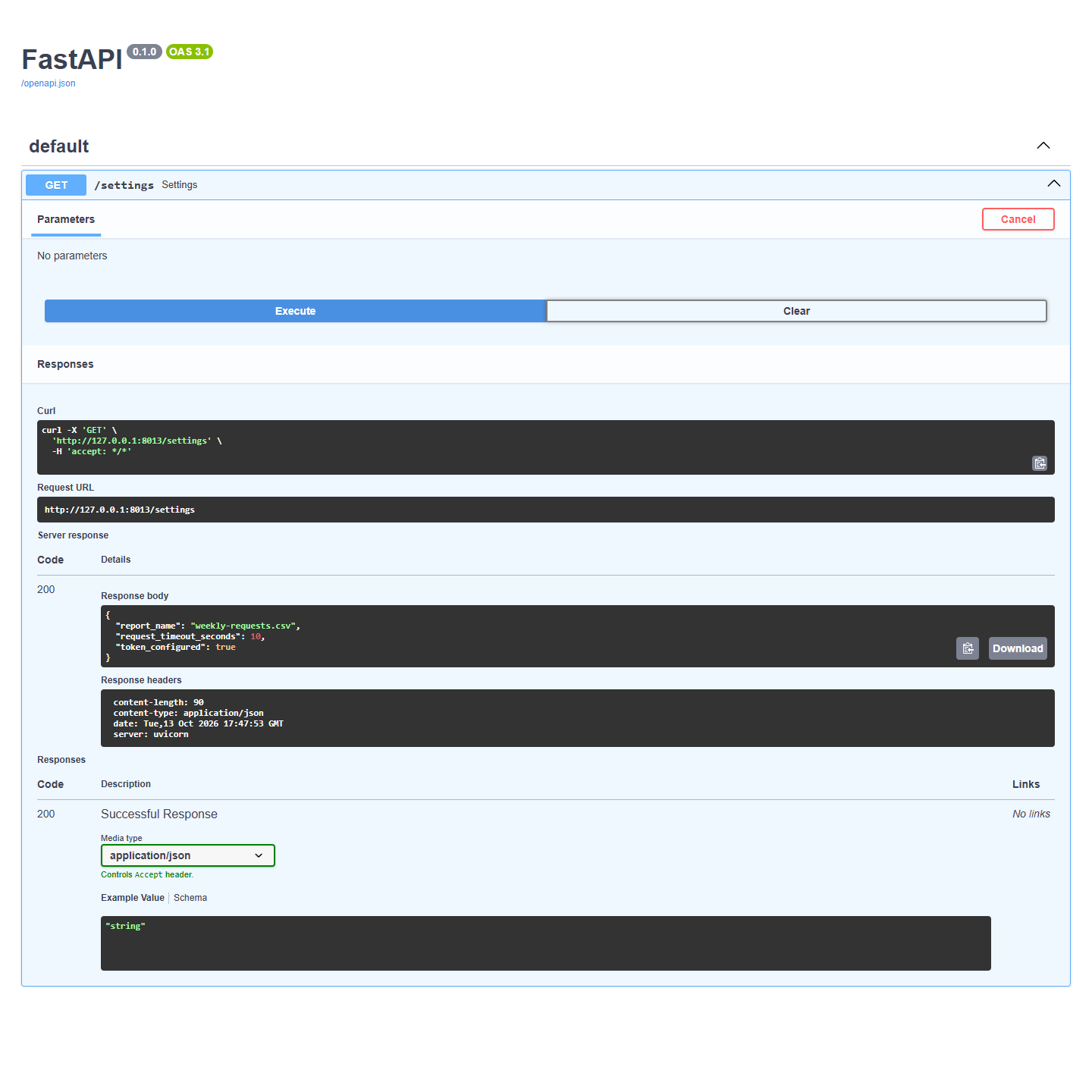
Before the bad-value check, use a fresh PowerShell window where $env:REQUEST_TIMEOUT and $env:API_TOKEN are empty. Keep any existing values intact: they take precedence over the file, so a file edit would not test the intended case.
Now press Ctrl+C, change REQUEST_TIMEOUT in .env to ten, save and start again. Startup should fail with the whole-number message. Correct it to 10 and restart. This catches bad configuration before requests are handled.
The example deliberately has defaults for the filename and timeout. Removing .env therefore does not itself fail startup; with no existing API_TOKEN in the environment, token_configured becomes false. A real API client should separately require its credential before making an authenticated request.
To check a missing token without deleting anything, stop the sample app, temporarily remove the fake API_TOKEN line from its .env, then restart. In a terminal without an existing API_TOKEN, the response should now say false. Restore the sample line afterward if you want to repeat the original check.
When an edit appears to do nothing
Restart after changing .env: this example loads it when the application starts. If an existing environment variable wins, inspect only the non-secret variable you are diagnosing. For example, $env:REQUEST_TIMEOUT in PowerShell shows whether that terminal already supplies the timeout. Do not dump all environment variables or print a credential to troubleshoot.
If you use Git, run git check-ignore .env and expect .env in the output. Ignore rules do not untrack old commits. If a real key was committed, rotate it with its issuer rather than assuming the rule repaired the leak.
For a precedence check, use a fresh PowerShell window in the sample folder where $env:REQUEST_TIMEOUT is empty. Set $env:REQUEST_TIMEOUT = '20' and start the app: the response should show 20 despite the file’s value of 10. Stop it, run Remove-Item Env:REQUEST_TIMEOUT to remove only that test variable, and restart to return to 10. If the variable was already set, keep its original value and do not overwrite it for this exercise.
A shareable .env.example can list the required names with safe placeholders; it must not contain your actual values. A host may supply environment variables directly, without any .env file. Keep the override=False behavior unless you have a clear reason to replace those values.
Press Ctrl+C to stop the local API. No background job or third-party connection was created.
Sources and useful links
- python-dotenv documentation — explicit files, precedence and Git exclusions.
- Python environment variables — values available to the running process.
- Python pathlib — an unambiguous path beside the script.
- FastAPI first steps — the local browser interface used in this example.