Formspree pricing: budget for a static site's contact form
Understand Formspree Free and paid submission limits, monthly versus annual payment, and what happens when a contact form goes over its allowance.
In this guide
Formspree charges for receiving and processing form submissions, separately from hosting your website. Free includes 50 submissions per month. For a small contact form needing more, the next question is the required allowance and features—not whether you should rent a server.
A static site serves ready-made files. Its HTML form still needs somewhere to send the message. Formspree can provide that receiver while you keep your existing hosting. If your current host already includes a suitable form service, paying for another one may be unnecessary.
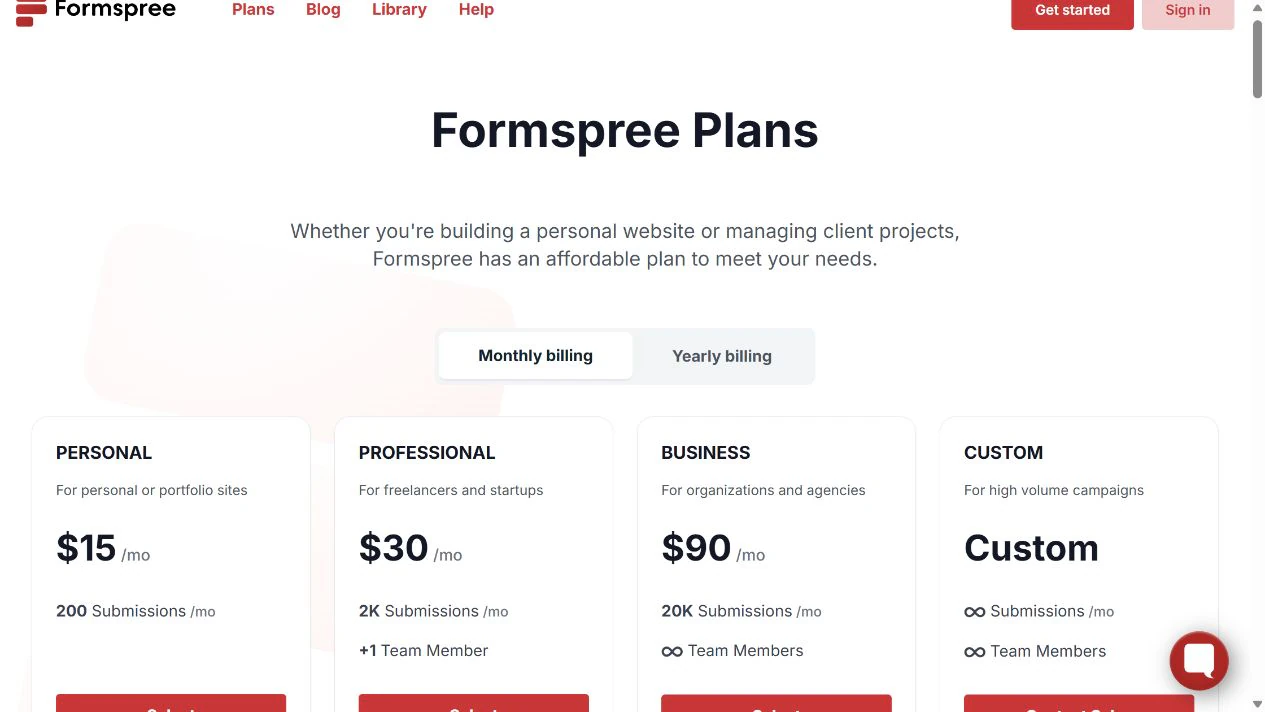
Public prices below were checked on October 8, 2026. They are USD, with the billing period stated explicitly. Confirm applicable tax and the actual subscription total at checkout; these are not invoice amounts from a purchased account.
The small-form plan boundaries
| Plan | Monthly submissions | Pay monthly | Pay yearly |
|---|---|---|---|
| Free | 50 | $0 | No paid commitment |
| Personal | 200 | $15/month | $10/month equivalent: $120/year |
| Professional | 2,000 | $30/month | $20/month equivalent: $240/year |
| Business | 20,000 | $90/month | $60/month equivalent: $720/year |
The monthly allowance belongs to the account; creating another form does not create another independent allowance. Count the expected contact, quote and signup submissions together if they use the same account.
Free includes basic spam protection and a 30-day submission archive. Paid tiers add capabilities as well as volume: Personal includes file-upload storage and a custom thank-you destination; Professional adds features such as autoresponses and premium integrations. Check the exact feature row on the current plan page, rather than assuming every paid plan has every integration.
An autoresponse is an email sent back to the person who submitted. It is different from the notification you receive about their message. Buying extra submission volume alone is not the same as adding that feature.
A concrete budget: 120 enquiries a month
Suppose your existing static site receives 120 ordinary contact messages a month, with no attachments, automated reply or premium integration. This is a planning example, not measured activity.
Free’s 50 is too small. Personal’s 200 leaves 200 − 120 = 80 submissions of margin, assuming the account has no other forms consuming it.
At monthly billing, three months cost 3 × $15 = $45. A full year paid month by month costs 12 × $15 = $180. The displayed annual equivalent is 12 × $10 = $120 paid for the year: $60 less over twelve months, but a longer commitment. It is not a $10 one-month subscription.
The existing hosting bill is unchanged in this example. A new domain, database, VPS or automation subscription is not required merely to receive the form. Your time replying to messages still matters, and any genuinely required external integration has its own terms.
What happens if the allowance runs out?
According to Formspree’s current over-limit rules, forms keep working for visitors, but new over-limit submissions are saved without normal notification emails or plugin processing.
They appear in an Over Limit folder with restricted previews. They are not equivalent to messages fully delivered to your inbox. Once room is available, you can reprocess them from the dashboard; reprocessing uses the current month’s allowance and then runs the normal email/plugins.
Do not rely on a future reset to deliver an urgent enquiry automatically. Check allowance alerts and the dashboard before a campaign. Reprocess deliberately: an integration may create the action it originally missed. Over-limit records also follow retention rules, so this is not indefinite free storage.
Choose on the feature that actually matters
Use Free to evaluate a low-volume form when the limit and archive fit. Verify receipt rather than trusting a thank-you page alone.
Consider Personal for a modest public contact form when the volume exceeds Free and its included features cover the job. Choose monthly while demand is uncertain; compare annual only when you are comfortable committing.
Look higher only for a demonstrated requirement, such as an autoresponse, premium integration or larger volume. If you simply need a hosted form link rather than an HTML form on your site, Tally and Google Forms may solve a different, simpler version of the task.
Your next action is to list the account’s total expected submissions, required reply/integration behavior and retention needs, then compare that list with the feature table. That avoids paying for a receiver your existing setup already provides.
Sources and useful links
- Formspree plans — current prices, allowances and feature matrix.
- Account limits — allowances, notifications and archive scope.
- Over-limit submissions — storage, reprocessing and notification behavior when the account is full.