Tally vs Google Forms: choose for the form you actually need
Compare Tally and Google Forms for a small enquiry or feedback form: Sheets, conditional questions, file uploads, branding and a clear reason to switch—or stay.
In this guide
Keep Google Forms if it already collects the answers you need and its appearance is acceptable. Consider Tally when a specific gap matters: no-sign-in file uploads, more flexible conditional fields, or a branded form address. A new form builder is not automatically an improvement over a working form.
This comparison is for a small public enquiry, signup or feedback form. It does not choose a system for confidential reporting, medical records or a complex checkout. Product conditions were checked on October 8, 2026.
Compare the differences that affect the job
| Need | Google Forms | Tally |
|---|---|---|
| Simple form and spreadsheet | Native connection to Google Sheets | Google Sheets integration on Free |
| Conditional questions | Route supported answers to different sections | Show/hide fields, jump pages and apply calculations on Free |
| Receive files | Respondents must sign into Google; owner needs Drive storage | No respondent account required; Free allows files up to 10 MB each |
| Own address and branding | Google-hosted responder link and native theme controls | Pro adds custom domains and branding removal |
| Public anonymous feedback | Possible without email collection, within access rules | Can omit identity fields; content can still identify a person |
| Usage constraints | Account, storage and Workspace policies still matter | Unlimited forms/submissions are subject to fair use |
A section is a separate page within a Google Form. It can be enough for “online workshop” versus “in-person workshop,” where each answer needs a different follow-up. You do not need another tool for that simple split; our conditional Google Forms guide shows the native path.
Field-level logic is different: for example, showing one optional upload field immediately after someone chooses “Include a reference.” If that behavior matters, check Tally’s logic with your actual questions. More options also mean more branches to maintain and test.
One task, two reasonable choices
Imagine a workshop organizer asking which session people prefer and whether they need accessibility arrangements. They already own a Google Form connected to Sheets. If it works for the audience, keep it. Creating another form and moving the answers creates work without changing the result.
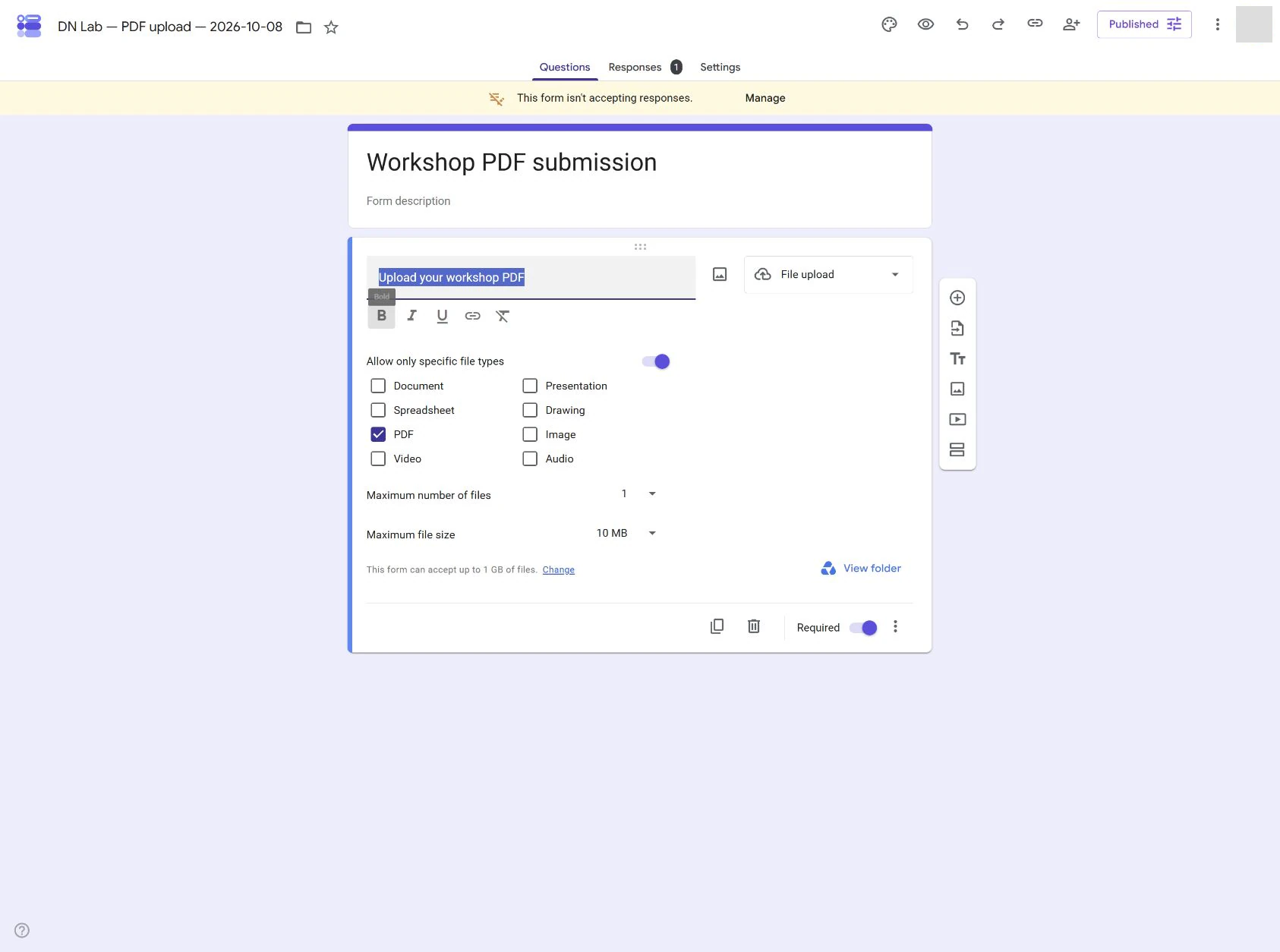
Now suppose participants must attach a small reference PDF and many do not have Google accounts. Native Google Forms uploads introduce a sign-in requirement. Tally’s no-sign-in upload can remove that barrier, provided the file size, privacy and fair-use conditions fit.
That is a reason to compare tools, not a reason to buy a paid plan automatically. A normal Tally upload up to 10 MB is available on Free. Do not claim that a different layout will increase completion or sales without measuring it in your own audience.
Check access to the answers and files
A public responder link lets someone submit; it must not become a link to edit the form or read other people’s answers. Keep results summaries private unless respondents are supposed to see them.
For Google Forms, check the form’s settings and the linked spreadsheet’s sharing separately. Work or school administrators may restrict external respondents or uploads. A personal-account example cannot override those policies.
For Tally, uploaded files normally require owner-side access. But exporting file links through integrations adds access tokens: someone with those links may open the file without signing into Tally. A shared spreadsheet containing upload links therefore needs deliberate permissions. A form being easy to answer does not mean its collected files should be easy for everyone to read.
Neither tool makes an answer anonymous simply because you did not ask for email. Names in comments, unique details and timestamps can still identify respondents.
Decide before rebuilding
Write down one requirement your current form fails to meet. If there is none, stay with it.
If you are starting from scratch and mainly want answers in Sheets, create a small Google Form and test it. If you need Tally’s specific field or upload behavior, use its official creation guide, then submit one harmless answer and check where it appears.
When the requirement is branding removal, a domain or a Business-only control, check Tally’s actual plan boundaries before subscribing. Include the time to recreate questions, test branches and preserve existing answers in the decision; the software price is only one part of switching.
Sources and useful links
- Google Forms question types — supported fields and the sign-in requirement for uploads.
- Google publication and access — responder permissions and summary visibility.
- Tally conditional logic — field and page conditions.
- Tally file uploads — Free size limit, respondent access and exported file links.
- Tally pricing — current Free and paid feature boundaries.