Tally pricing: when Free is enough and what an upgrade changes
Choose Tally Free, Pro or Business by the feature you need, with monthly billing, fair-use limits and a small form-cost example explained clearly.
In this guide
A small Tally form does not need a paid plan just because it receives more answers. Free includes unlimited forms and submissions under Tally’s fair-use policy. Pro mainly adds branding, collaboration and other advanced features; Business adds controls such as automatic data retention and email verification.
Start with the feature you cannot do without. “We need 120 enquiries this month” and “The form must use our domain without Tally branding” are different purchase decisions.
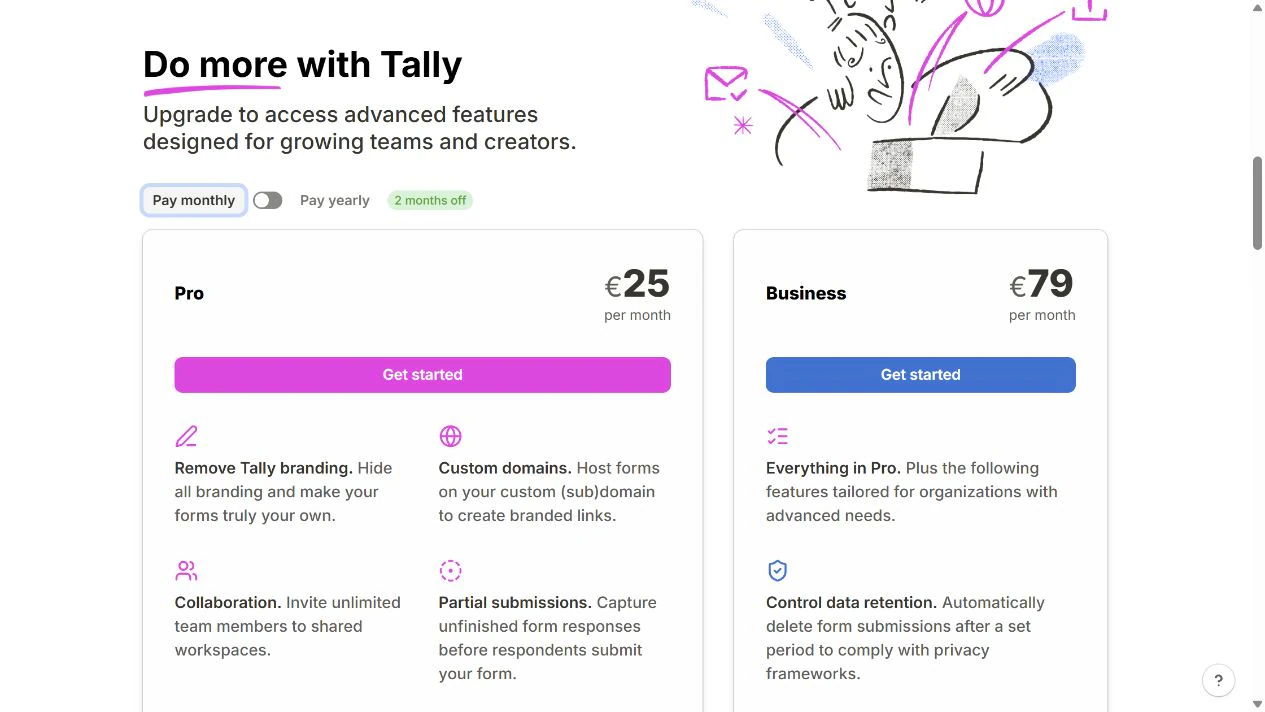
The public conditions below were checked on October 8, 2026. Prices in the table are the EUR prices displayed with Pay monthly selected, not a currency conversion or an annual price divided by twelve. Tally bills in EUR or USD according to location; check the currency, tax and amount on your own checkout before subscribing.
Pick the feature, then the plan
| Plan | Displayed price | A practical reason to choose it |
|---|---|---|
| Free | €0 | Ordinary forms, conditional questions, Sheets integration and uploads up to 10 MB per file, with Tally branding |
| Pro | €25/month | You genuinely need branding removal, a custom domain, team workspaces or other Pro features |
| Business | €79/month | You need its automatic retention controls or verified-email feature, beyond Pro |
Conditional logic means adapting questions to an earlier answer. It is already available on Free. Do not upgrade simply because you need to show a follow-up field or send answers to Google Sheets.
A custom domain is your own address for the hosted form. Pro enables the connection; buying a domain is a separate expense if you do not own one. You do not need a new domain merely to share a Tally link or embed a normal form in an existing website.
A small example: 120 project enquiries
Suppose one freelancer collects 120 enquiries in a month. Each answer contains a name, email and short project description. They accept Tally branding and need no paid notification feature, large upload or automatic deletion schedule.
For that example, the Tally subscription can remain €0. The response count alone is not a reason to buy Pro. Time spent reading and replying is still work, and a connected paid service remains its own expense.
Now add a real requirement: the form must use the freelancer’s existing domain and hide Tally branding. At the displayed monthly Pro price, three monthly periods cost 3 × €25 = €75, before any applicable checkout tax. That calculation buys the selected features, not more guaranteed enquiries.
Business is not the next step merely because the form supports a business. Choose it only if a Business feature solves a specific requirement. An automatic retention setting is a tool for deleting old submissions, not a guarantee that your entire process meets a legal obligation.
“Unlimited” still has conditions
Tally’s fair-use policy covers both Free and paid plans. It describes sustained high submission, upload or email volumes that may require a separately billed custom plan. A spike and consistently heavy use are treated differently; unlimited is not a promise of any workload at any cost.
The Free 10 MB limit is per uploaded file. If your form needs larger files, that can be a genuine Pro reason. Check the current upload rules, including who can access links exported into other tools. Making an upload available in a spreadsheet can widen access to it.
For an ordinary small enquiry form, do not add large-file storage, an automation subscription or a domain to the budget unless the task needs them.
Monthly billing is different from a yearly commitment
The pricing page offers Pay monthly and Pay yearly. The yearly display is a monthly equivalent for an annual subscription; it is not a promise that you can pay that smaller amount for just one month. Tally’s billing documentation describes a yearly discount equivalent to two months.
Choose monthly while the paid requirement is temporary or uncertain. Choose yearly only after checking the full upfront amount and deciding you will use it for the year. Do not reconstruct the invoice by multiplying a rounded display number.
Paid subscriptions renew. You can cancel renewal in Settings → Billing → Manage subscription; paid features continue until the prepaid period ends. Tally does not generally refund unused time or late cancellation. It does not offer a paid-plan free trial, so avoid treating an upgrade as a harmless trial button.
Your next check
List the exact features your live form needs, then try the complete form on Free. If you are new to Tally, its creation guide shows the setup. Submit one harmless answer and confirm it appears in the form’s Submissions tab. Keep Free if it delivers the result. If branding, large files or retention blocks that result, open the current pricing page and check only the plan that removes that block.
If you already collect the same answers successfully in Google Forms, compare the two tools before moving your data or buying another subscription.
Sources and useful links
- Tally pricing — live currency display, billing toggle and included features.
- Plans explained — the purpose of Free, Pro and Business.
- Billing and cancellation — currency, renewal, cancellation and trial rules.
- Fair-use policy — conditions behind unlimited use.
- File uploads — file-size limits and access when exporting upload links.