Streamlit secrets.toml: keep settings out of your app code
Load local Streamlit settings from secrets.toml, keep the file out of Git, and confirm configuration without displaying a credential.
In this guide
An API key does not need to be pasted into app.py. For a local Streamlit app, put configuration in .streamlit/secrets.toml and read it with st.secrets. Keep that file out of Git, and confirm that the key is present without printing its value.
Here you will make a small configuration check using a fake token, then know where a real token would belong. This is local setup, not a guide to publishing an app or obtaining an API key. The file is plain text, not an encrypted vault.
Prepare the project and ignore the private file first
Use your existing Streamlit project and environment if you have them; skip the two environment commands below. For a new project, create streamlit-settings, open it in File Explorer, type powershell in the address bar and press Enter. The example uses Windows PowerShell, Python 3.12 and Streamlit 1.65.0. Check python --version; use the official Python downloads if needed. Only for that new folder, run:
If python --version reports another version, select your installed Python 3.12 interpreter before creating the sample environment. On Windows with the Python launcher, py -3.12 --version checks that interpreter and py -3.12 -m venv .venv creates the sample environment with it; if it is not installed, finish the official installation first.
python -m venv .venvAfter success:
.\.venv\Scripts\python.exe -m pip install streamlit==1.65.0Before entering any real credential, add these lines to .gitignore in the project folder, preserving its existing rules:
.venv/
.streamlit/secrets.toml
If you use Git, run git check-ignore .streamlit/secrets.toml after creating the file below. The output should name that path. An ignore rule does not remove a file that was already committed; if a real credential reached Git history, revoke or rotate it with the issuer. Hiding the current file is not enough.
Save the local settings
Create a folder named .streamlit inside your project. In it, save secrets.toml as plain text, not secrets.toml.txt:
report_name = "Weekly requests"

[service]
api_token = "not-a-real-token"
TOML is a settings format: text values are quoted, and [service] groups the key beneath it. The placeholder above cannot authenticate to anything. For a real integration, replace it locally with the credential issued by that service; do not put that value into screenshots, error messages or sample repositories.
Save this complete app.py beside .venv, or adapt the read/check section to your existing app:
import streamlit as st

st.title("Configuration check")
st.caption("Show safe settings, never the token itself.")
try:
    report_name = st.secrets["report_name"]
    token = st.secrets["service"]["api_token"]
except (FileNotFoundError, KeyError):
    st.error("Check .streamlit/secrets.toml and its report_name and service.api_token keys.")
else:
    st.write(f"Report: {report_name}")
    if not isinstance(token, str) or not token.strip():
        st.error("The API token is missing or empty.")
    elif token == "not-a-real-token":
        st.info("Sample token loaded. No real service is connected.")
    else:
        st.success("A token is configured. Its validity has not been checked.")
Notice the two different results: configured means the file supplied a non-empty value; valid would require a successful authenticated request to the actual service. This app does not make that request.
Start and verify
From the project folder:
Use the command below for the new example. In an existing app, keep its usual environment and script. From its activated environment, python -m streamlit run your_script.py --server.address 127.0.0.1 starts the current file when you replace the filename with its actual name. Keep the settings folder at that project’s root.
.\.venv\Scripts\python.exe -m streamlit run app.py --server.address 127.0.0.1Open http://127.0.0.1:8501 or the reported Local URL. You should see Report: Weekly requests and Sample token loaded. No real service is connected. You should not see the token’s value.
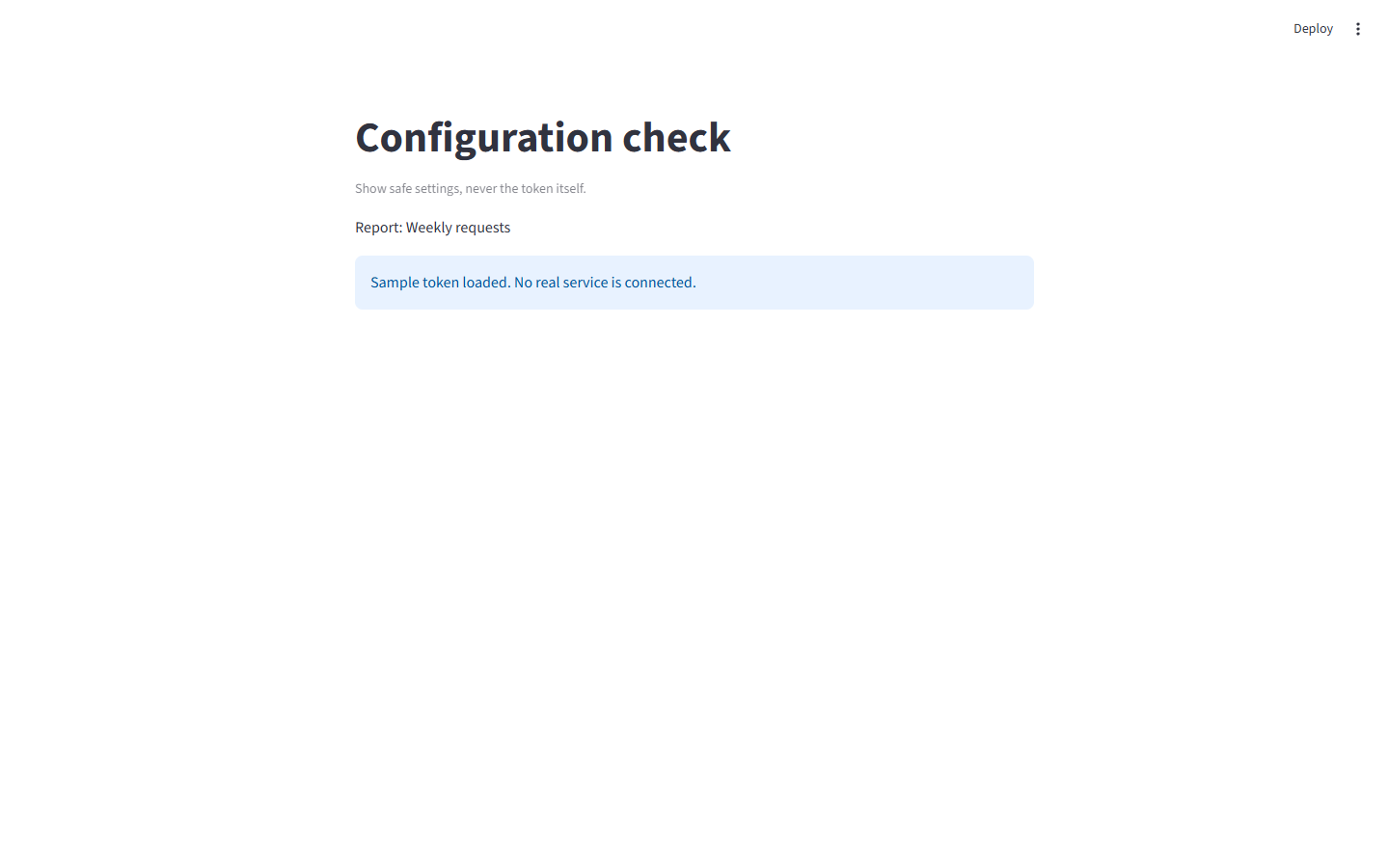
Change report_name in the TOML file, save it, press Ctrl+C in the terminal and run the start command again. Refresh the browser and check the new name. Restart after creating or changing this settings file; merely rerunning a widget is not a dependable way to reload it.
If the file is missing, check the folder and exact extension. If a key is missing, keep [service] above api_token and match the spelling. A TOML syntax error needs fixing in the settings file: check quotes and section brackets. Do not paste the full file into a support message if it contains a real credential.
When the app moves to a host
The local ignored file does not travel with a Git deployment. Streamlit Community Cloud has a separate secrets setting for the deployed app; the official hosted-secrets guide shows where to enter the same TOML configuration. Other hosts may use environment variables or their own secret stores.
Do not solve a hosted missing-secret error by committing the private file. For local work, press Ctrl+C when finished; the token remains in your local settings file until you remove or replace it.
Sources and useful links
- Streamlit secrets management — local files, key access and restart behavior.
- Community Cloud secrets — the separate hosted setting.
- Streamlit configuration — distinguishing configuration files from app secrets.